Show Needle Occupancy
This function displays a stitch or tuck lying on the needle. The display is added to the existing needle actions of the pattern and can be partially or completely hidden by it.
The needle occupancy of the entire needle bed is visible in an empty or transfer row.
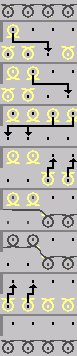
In the picture above, the needle action is shown in black and the needle occupancy in yellow.
Display the stitch structure stitch or tuck lying on the needle:
- The technical view of the pattern is active.
- The pattern is displayed in the technical row presentation.
- 1
- Call up the function in the context menu of the technical view.
- A stitch structure Stitch or Tuck that is located on the needle will be displayed with a separate color.
The enabled function is displayed with a check mark. Calling up the function again disables it.
The color can be defined with the functions in the menu.