Propose Rail Allocation (dialog box)
This dialog box helps when allocating the yarn carriers to the yarn carriers tracks.
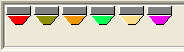
In the default setting the yarn carriers are in the Undefined yarn carrier magazine. If there are already yarn carrier specifications in the pattern, they will be set on the corresponding yarn carrier rail. The yarn carriers are shown with the same symbol as in the Yarn field allocation dialog box.
- Get the yarn carrier allocation proposed:
- if using more than 16 yarn carriers.
- if using weft yarn presser foot.
by the option
 - Generate the yarn carrier fields before you request a proposed yarn carrier allocation.
- Request a proposed yarn carrier allocation before you adjust settings in the Yarn field allocation dialog box.
This function will generate a proposal, only if the pattern permits.
The result is a proposal; other yarn carrier allocations are possible as well.
The main components of the dialog box:
|
Element | Meaning | |
|---|---|---|
Yarn carrier magazine | Magazine for yarn carriers that are not yet allocated to any yarn carrier rail. The left or right home position and the direction in the and section will not be taken into account. | |
| Display the yarn carrier number when running with the mouse over the yarn carrier. | |
Yarn carrier rails | Graphic presentation with the available home positions at the left and right. | |
|
| No Parking |
| No Parking | |
| By clicking on it you switch the parking prohibition on or off. | |
Display Field |
| |


Possible settings in the section:
|
Element | Meaning | |
|---|---|---|
section | ||
|
| Leave the already allocated yarn carriers on its position. |
| Allocate the yarn carriers so that a secure yarn insertion is also carried out when widening the color field. | |
|
| Assign the yarn carriers so that the weft yarn carriers are placed on the inner tracks.
Inner Tracks:
|
| ||
section | Regard especially the basic colors | |
|
| Do not distinguish between basic color and fancy color.
|
| Allocate the yarn carrier of the basic color to a rail in front of the decorative color (ornamental stitch). | |
| Allocate the yarn carrier of the basic color to a rail behind the decorative color (ornamental stitch). | |
button | Allocate the yarn carrier to the rails automatically | |
button | Apply the proposed allocation in the dialog box. | |
button | Cancel the proposed allocation. | |
 : If the checkbox
  is not active you position all the allocated yarn carriers in the magazine.
Request the proposed yarn carrier allocation:
- Yarn carrier fields are generated
- No settings adjusted in the Yarn field allocation dialog box yet.
- 1
- Click the Propose rail allocation button in the Yarn field allocation dialog box.
- The Propose Rail Allocation dialog box appears.
- 2
- Set the desired option.
- 3
- Click the Start Calculation button.
- 4
- The result of the calculation will be displayed.
- 5
- Check the proposal.
- 6
- Click the Check proposal button to apply the proposed allocation in the Yarn field allocation dialog box.
- or -
Modify the options and re-start the calculation.
- or -
Click on Close, adjust the yarn carrier specifications in the Yarn field allocation dialog box and request again an allocation proposal.
Edit the applied proposal in the Yarn field allocation dialog box.
If no proposal has been found:
Possible causes:
- Color fields with an odd-numbered height.
With an odd row number the home position changes. - Narrow color fields
The ideal minimum distance between the color fields has not been reached.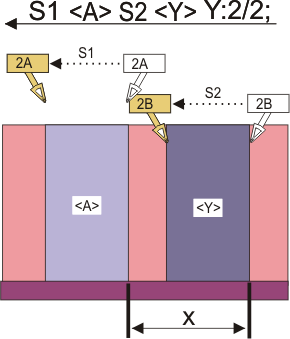
- 1
- Check and correct the pattern.
- 2
- Request again a proposed yarn carrier allocation for the yarn carrier.
- or -
Adjust the yarn-carrier specifications in the Yarn field allocation dialog box and request again an allocation proposal.