Sequence Editor
With the Sequence Editor you can generate new sequence files (.seqx / .setq ) or edit existing sequence files. When doing so, the specified names must correspond to the names of the knitting programs.
You can call up the Sequence editor with the / menu.
The dialog box consists of the following elements:
|
Element |
Meaning |
|---|---|
|
Input field |
Enter sequence name. |
|
|
Knit sequence in different making-up sizes. |
|
|
The EAY command will be inserted between the sequence elements. |
|
|
Generate a sequence with Setup1 data (.seq) |
|
|
Generate a sequence with Setup2 data (.seqx) |
|
|
Yarn length control with original piece (Masterpiece) |
|
Input field |
Entry of the sequence comment line, with which the sequence definition begins. |
|
|
Display consecutive numbering of lines. |
|
Input field |
Enter the name of the sequence element (example: Vt).
|
|
|
Activate the program sections available in the respective sequence element. |
|
Section |
Enter the repetition factor for the sequence element (quantity). |
|
|
Specify the beginning with which line of the jacquard in the machine memory is deleted. |
|
Input field |
Specification of cycle counters and counters / other commands. |
|
Input field |
Input of comments assigned to a sequence element. |
 : The entry of a sequence name is not mandatory, however it simplifies the editing of the sequence on the machine. Only those knitting programs which contain the sequence names are displayed there.


A maximum of 32 programs can be displayed.
If a common Setup file is used for the sequence, it must be separately located at the first position. As a result, this will now only be loaded once and will be skipped over during the next sequence run-throughs.
If the Setup file is not located in the first position, it will be loaded during each sequence run-through.
This Setup file can only be loaded with the machine stopped. The carriage waits at the reversal point until the Setup file is loaded. This also applies when several Setup files are used.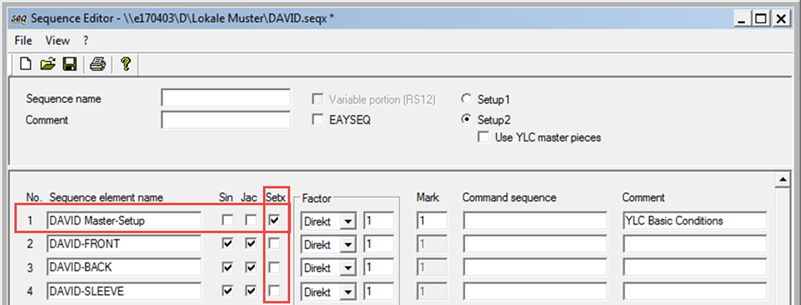
With the cycle counter RS 12 different sizes of a fabric piece can be knit consecutively with the same sequence.
For this purpose, the size must be specified after the sequence name in the file name of the knitting programs.
Example: DAVID-38-VT, David-38-RT, DAVID-38-ARM
Now a sequence file must be generated in which the check box is switched on. Then a sequence list with this sequence file in which only the RS 12 is different is generated on the machine.
Example of a sequence list:
|
Sequence name |
var. part (RS12) |
|---|---|
|
DAVID- |
42 |
|
DAVID- |
40 |
|
DAVID- |
38 |