Change the language
The language of the M1plus user interface can be changed without a new installation of the software.
For this purpose, select the desired language during the M1plus installation, so that they are installed for a switch over later.
Selected components (e.g. languages for the user interfaces of the M1plus programs) can be installed afterwards or can be removed individually.
Incomplete representation of texts
Russian or Turkish texts are displayed incompletely or as vertical bars.
The locale does not correspond to the language of the M1plus user interface
Adjust the locale (control panel) for programs that do not support unicode to the desired language.
If required:
Call up / / tab.
Activate  .
.
After restarting the translated texts will be displayed correctly.
Change the language:
- The desired languages were selected during the M1plus installation.
- All programs of the M1plus closed.
- 1
- Run the
 / / function in the Windows Start menu.
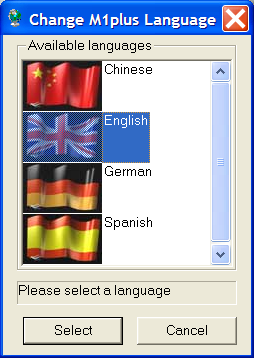
- The Program Change M1plus Language will be opened.
- 2
- Select the desired language and confirm with Select
- After the language switching is finished, the M1plus program starts with the newly set language.