Miscellaneous of version 5.0
- When copying stitch length Transparent within modules, CA and MA the original stitch length of the module was previously retained.
This behavior is correct for inserting modules in the pattern.
But when copying within a module, CA or MA or inserting another module, the stitch length Transparent will also be copied. - Shape counter limitation canceled
 Use different shape counters for the left and right fabric piece.
This setting allows Sintral functions.
 : This requires the V 3.005 or higher operating system for CMS ST211 - ST468.
- Compare sin, jac and set
In the Sintral Editor (UltraEdit), you can compare the MC program files sin, jac and set on a text basis using the / function. - Extended coordinate display in all control columns
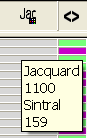
Helpful when inserting CAs into the control column. - Sintral and Jacquard line numbers will be displayed in the control column
Sintral and Jacquard line numbers will be displayed as tooltip in the control column  .
.
- The knitting program was generated for the active pattern.
- The
 checkbox in Configuration / is not active.
- The settings for presser foot of Configuration / is displayed in the
 control column
 - The selected plating colors are presented in the Tool properties toolbar.
Example: 
- Delete modules not used
You can delete local modules and pattern elements of the Modules toolbar by the function of the context menu. - Size modification with counters
- for 1-piece pattern and 2-piece pattern with knitting-in before start
- separate size corrections for the left and right edge by additional counters in Configuration /
- Optimized stopping positions of yarn carriers independent to the racking position
Deactivate the option in Program Settings dialog box / tab for CMS Operating System before 3.007 or in order to get the stopping positions calculated including the racking course.
Sintral command: Y-1A:F1AY^0; - New behavior of the Ctrl + Shift + LMB key combination with yarn fields:
- In the Yarn Field View:
All yarn fields and all yarn carriers will be selected.
An entry (e.g. correction value) applies to all yarn fields of all yarn carriers - In the Yarn Field Allocation dialog box:
All yarn fields of the yarn carriers will be selected.
An entry (e.g. correction value) applies to all yarn fields of this yarn carrier.