Knitting-in with Knot Split
New method with splitting:
The red yarn (contrast color) is knitted-in and splitted with floating.
The following transfer fastens the yarn at the stitch below it.
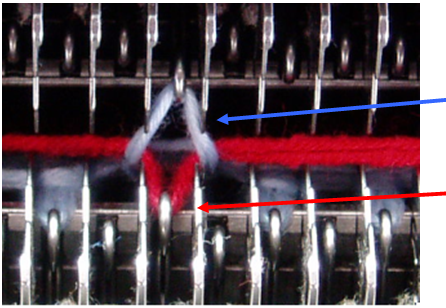
Blue arrow: Stitch splitted to the back (normal yarn).
Red arrow: Front stitch bound-in (contrast color).
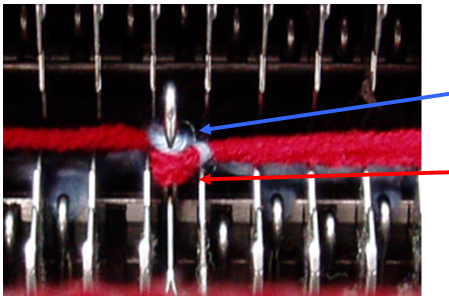
Blue arrow: Split stitch transferred from the back to the front to fasten the bound-in yarn (normal yarn).
Red arrow: Bound-in stitch that is in front of the split stitch (contrast color)
Split knots with the following conditions:
- Limit modules in order to detect the split-stitch in front or back automatically
- Two pattern rows for the knots and overwriting the source row areas.
- Swiveling of the yarn carrier is switched off in the splitting row to prevent binding the thread with transferring.
|
| |||
|
|
| ||
|
|
| ||
|
|
| ||

Knitting-in and out the yarn with split knot:
- The machine must have split cams.
- 1
- Activate
 in the Configuration / / section.
 - 2
- Select the knot module Technique / Intarsia Knit-in / Binding with knot / Knot Split.
- or -
Make the same settings in the Yarn Field Allocation dialog box for individual yarn fields.
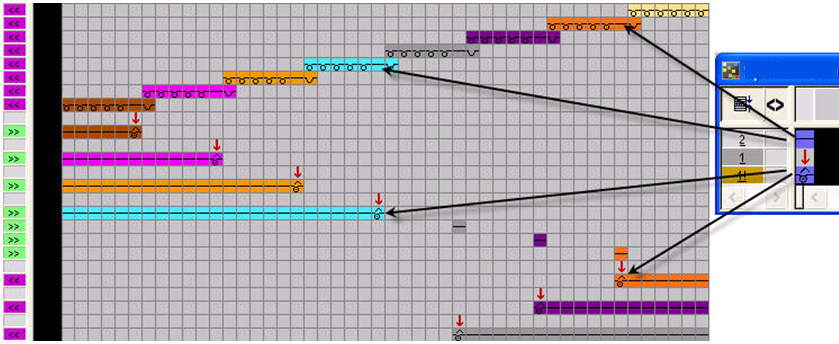
Knitting-in with Split
Knitting-out with Split
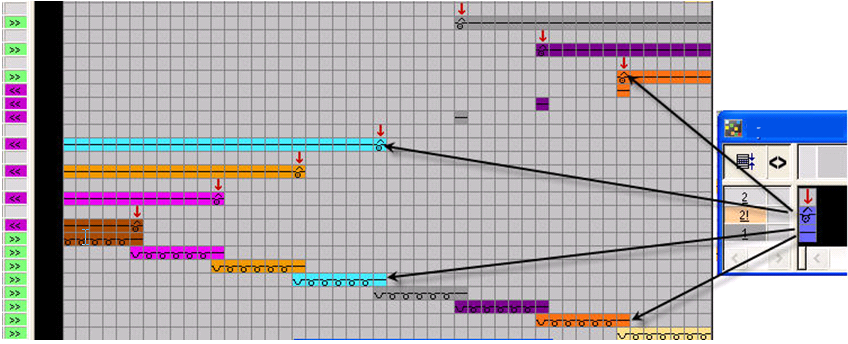
 :
:
Overlapping knots will no longer be moved in order to realize the split knot.