Minitool Window - Fast Selection of Colors and Needle Actions
For a fast selection of colors and needle actions you can have displayed a Minitool window at the cursor now.
Activation
You have the following options for activation:
- Mouse gesture
Quickly move the mouse horizontally in zigzag without holding down any additional key. For this purpose the function must be active in the menu under the Program settings dialog box in the tab. - Press the Ctrl key twice.
- Press the # key
Minitool window
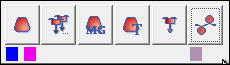
Below the large buttons you select for each two small buttons, which list the most recently selected colors and needle actions.
These buttons are presented with the corresponding color and the tooltip indicates the color number.
With needle actions the corresponding module color is presented and the tooltip indicates the designation.
Deactivation
The deactivation of the Minitool window via the mouse gesture is performed in the menu under the Program settings dialog box in the tab.