1x1 technique in the design mode
A design pattern can be converted into 1x1 technique before expanding in the processing step .
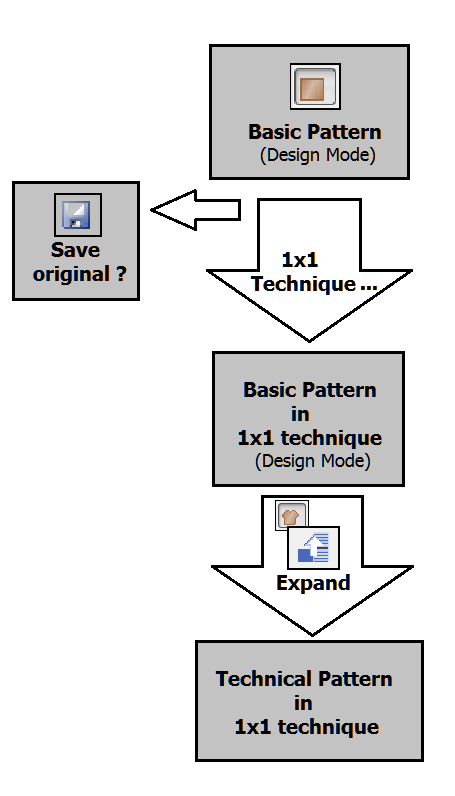
Procedure:
- The design pattern is loaded as basic pattern.
- 1
- Run the function in the menu.
- The Replace starts dialog box appears.
- The setting was changed from to
- Starting width of pattern was doubled.
- 2
- Make the desired changes.
- 3
- Confirm entries with OK.
- A prompt, whether the original pattern is to be saved, appears.
- 4
- Save original pattern.
- The pattern was converted to 1x1 technique and is given a name extension -1x1.
Changes when converting to the 1x1 technique:
- Needle actions, modules, color arrangements
- Automatic insertion of the needle action Float in every second column. This way, the pattern width is doubled.
- Automatic insertion of floats with modules and Color Arrangements but not with Module Arrangements.
- Doubling the racking.
- Changing with an equivalent module in 1x1 technique. The allocation of such a module is possible via the Properties dialog box of the module. The generation and allocation is carried-out manually.
In the module database there are modules that already have the corresponding link with their 1x1 modules, for example:
Stoll/Standard/Pointelle → Stoll/1x1-Technique/1x1-Pointelle
Stoll/Standard/Cables single sided float → Stoll/1x1-Technique/1x1 Cables single sided float
- Shape
- A placed shape will be widened accordingly during the conversion to 1x1 technique.
- The shape attributes remain unchanged and must be adapted if necessary.
- Cut modules can be replaced via the processing step in the Replace cut modules dialog box.
- The starting point of the 1x1 modules in the replacing area is the position >1, ^1.
- These modules are additionally offered for selection in the Replace cut modules dialog box.
1x1 Stitch v with Transfer, 1x1 Stitch ^ with Transfer, MG_Stitch v with Transfer, MG_Stitch ^ with Transfer. - With the check box in the Text in pattern element dialog box a pattern element in 1x1 is generated based on the created pattern element.