Overlapping Shape Elements
The GKS Dimensioned Shape specifies the relative z-order of the shape elements.
- Layer 0 = Basic Pattern = Z-Order 0/2
- Layer 1 = Lowest knitting element of the GKS-Dimensioned Shape = Z-Order 1/2
- Layer 2 = Highest knitting element of the GKS Dimensioned Shape = Z-Order 2/2
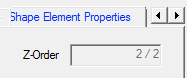
- Which information win?
- Higher layer against lower
 Whole against dart, gore, and within shape
 Dart against gore and within shape
- Fading-out
 against Border Options
GKS Tools to Set the Z-Order of Shape Elements

Commands in the group:

Brings the selected object to the foreground.
Brings the selected object one layer to the front.
Sends the selected object to the background.
Sends the selected object one layer to the back.
The commands affect objects of the same kind only.
- Overlapping knitting ranges
- Knitting ranges are placed directly upon the basic element
- Fading-out of the basic element always covers the knitting range
- The fix order of shape elements from buttom to top:
 Within Shape
 Gore
Gore- Dart
- Hole
- You can arrange the shape elements of the same type.