Help on Help
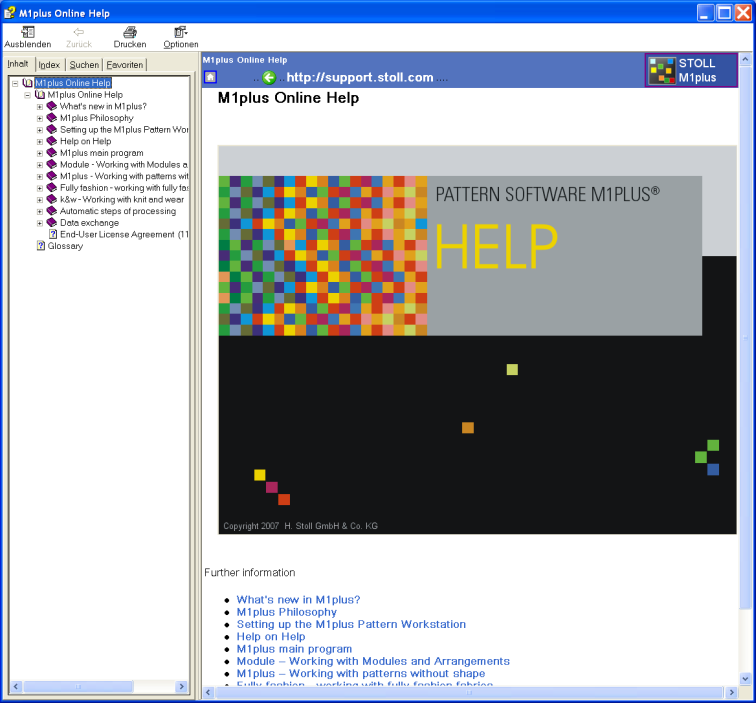
The following functions are contained in the toolbar of the M1plus help:
|
Function |
Destination |
|---|---|
|
|
Hiding the left navigation bar with the three tabs Contents, Index and Find.
|
|
|
Display the left navigation bar with the three tabs Contents, Index and Find.
|
|
|
Switching to the last displayed page.
|
|
|
Printing displayed page. |
|
|
Opening menu with additional options. |
 : Only available with the navigation bar displayed.
The following functions are contained in the menu:
|
Function |
Destination |
|---|---|
|
/ |
Hide/display navigation bar with registers. |
|
|
Switching to the last displayed page. |
|
|
Change to the next page. |
|
|
Change to start page. |
|
|
Cancel action. |
|
|
Update screen display of the M1plus help function. |
|
|
Setting Internet browser. |
|
|
Printing displayed page. |
|
/ |
Hide/display highlighting of search terms in the sites found. |
The following elements are contained in the navigation bar of the M1plus help:
|
Element |
Meaning |
|---|---|
|
tab |
Display table of contents of M1plus help. |
|
|
Display subdirectories by clicking on the + symbol. |
|
|
Hide subdirectories by clicking on the - symbol. |
|
tab |
Display key word directory. |
|
Input field |
Enter a search term in the input field to jump to the corresponding entry in the index. |
|
Display button |
Displaying the page selected in the key word directory. |
|
tab |
Display search function for the entire document |
|
Input field |
Enter a search term in the input field to display pages with the desired key word in the navigation bar. |
|
List of topics button |
Start search via M1plus help. |
|
Display button |
Display pages selected on the tab. |
|
tab |
Display list of favorites. |
|
button |
Remove favorites from the list. |
|
button |
Display favorite. |
|
Input field |
Change name of the current page for the list of favorites. |
|
button |
Copy current page to list of favorites. |