Status line (yarn field view)
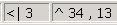
When the yarn field view for a pattern or module is active, the following information is shown in the status line from left to right for the current cursor position within the window:
|
Display |
Meaning |
|---|---|
|
Yarn field x |
Yarn field number |
|
Color |
Yarn field color |
|
|
Yarn number, yarn carrier field and yarn carrier. |
|
|
Column and row (technical row, pattern row) |
|
or |
Column starting from the center and row (technical row, pattern row) with active function. |


The displayed data are contained in the Yarn field allocation dialog box.