Key combinations (M1plus main program)
With key combinations, also called key commands, hotkeys or shortcuts, you run frequently used functions in the M1plus main program quickly and directly.
The key combinations in the M1plus main program:
|
Key combination | Function |
|---|---|
F1 | Calling up help. |
F2 | Display shape symbols and edge color |
F3 | Module / Module Explorer of Database |
F4 | Open the Yarn field allocation dialog box |
F5 | Toolbar Drawing Tools / Apply module |
F5 | Apply shape attributes. |
F5 | Select the knitting cycle in the module bar |
F6 | Toolbar Drawing Tools / Apply color |
F6 | Select the shape edge to which the cursor is pointing in the shape attribute table. |
F5+F6 | Drawing Tools toolbar / Apply module and color. |
F7 | Drawing Tools toolbar / Apply shape attributes |
F8 | Selection / Group / Group to one pattern row. |
F9 | Steps of Processing / Expand Pattern |
F10 | Steps of Processing / Start Technical Processing |
F11 | Generate MC Program. |
F12 | File / Save as. |
| |
. (period) | Context menu: |
, (Comma) | Context menu: |
/ (slash) | Context menu: |
B | Drawing tool |
E | Display the control view. The last used function from the Control views toolbar will be used. |
M | Drawing tool |
N | Drawing tool |
P | Protect Selection |
V | Drawing tool |
X | Synchronize the views. |
Z | Zoom level, with which the entire pattern can be displayed. Activating again the key restores the previously used zoom level. |
Space bar (Shape view) | If the mouse cursor is found in the Shape view, the display is scrolled in the direction of the mouse cursor. |
| |
Ctrl+F4 | View / Overview |
Ctrl+F3 | Open Module Explorer of Pattern |
Ctrl+F4 | Edit / Generate or edit Jacquard |
Ctrl+F5 | Technical Row Presentation |
Ctrl+F6 | Pattern Row Presentation |
Ctrl+F8 | Selection / Group / Cancel grouping |
Ctrl+F9 | Pattern Parameters / Technical Row Data |
Ctrl+F10 | Start step-by-step technical processing |
Ctrl+F11 | MC Program / Conduct Sintral Check... |
Ctrl+F12 | File / Close |
| |
Ctrl+A | Selection / Select All |
Ctrl+B | Selection / Go to selection |
Ctrl+C | Edit / Copy |
Ctrl+D | Selection / Cancel Selection |
Ctrl+E | Generate the most recent used control view and position it at the front. |
Ctrl+F | Search and Select |
Ctrl+H | Find & replace |
Ctrl+I | Edit / Paste Mirrored |
Ctrl+K | Context menu: |
Ctrl+L | Pattern Parameters / Stitch Length... |
Ctrl+M | Module/New module |
Ctrl+N | File/New Pattern |
Ctrl+O | File/Open |
Ctrl+P | Unprotect Completely |
Ctrl+R | Pattern Parameters / Cycle... |
Ctrl+S | File / Save |
Ctrl+U | View / Activate Automatic Transfer |
Ctrl+V | Edit / Paste |
Ctrl+W | Pattern Parameters / Fabric Take-Down... |
Ctrl+X | Edit / Cut |
Ctrl+Y | Edit / Redo |
Ctrl+Z | Edit / Undo |
Ctrl+. (period) | Context menu: |
Ctrl+, (comma) | Context menu: |
Ctrl+- (slash) | Context menu: |
Ctrl+Del | Delete selected columns
|
| |
Shift+F2 | Toolbar Module data / Apply colors and needle actions |
Shift+F3 | Toolbar Module data / Apply needle actions |
Shift+F4 | Toolbar Module data / Apply colors |
Shift+F5 | Pick all shape attributes of this position (beside edge color) |
Shift+F6 | Open the symbol view |
Shift+F7 | Yarn color for the background, module color for the symbol in the symbol view |
Shift+F8 | Module color for the background, yarn color for the symbol in the symbol view |
Shift+F9 | Pattern Parameters / Configuration |
Shift+F10 | Load the pattern in state before Technical Processing |
Shift+F11 | Shape / Shape editor (Generate/edit shapes)... |
Shift+F12 | Display Additional Beds |
| |
Shift+1 | Edit / Define Reference Row |
| |
Alt+F2 | Shape / Open and Position Shape |
Alt+F3 | File/Import/Modules |
Alt+F4 | File / Exit M1plus |
Alt+F5 | Selection / Fill |
Alt+F6 | View / Options / Rear View |
Alt+F7 | Shape / Use shape |
Alt+F8 | Shape / Remove Shape |
Alt+F9 | File/Import/Picture as pattern |
Alt+F10 | Sintral / Show Sintral |
Alt+F11 | File / Import / Sintral Check as Pattern... |
Alt+F12 | MC Program / Import MC Setup / Setup File... |
Alt+↑ | Pattern scrolling upwards |
Alt+↓ | Pattern scrolling downwards |
Alt+← | Pattern scrolling to the left |
Alt+→ | Pattern scrolling to the right |
| |
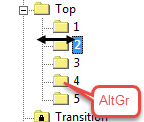
AltGr+ | Sorting module groups by AltGr key pressed. |
| |
Ctrl+Shift+F10 | Load the pattern state Basic pattern |
Ctrl+Shift+F11 | Shape / Shape Wizard (Put together k&w shape)... |
| |
Ctrl + Shift + A | Pattern Parameters / Auxiliary take-down |
Ctrl + Shift: + B | Pattern Parameters / Belt take-down |
Ctrl+Shift+F | Find and select / In entire pattern (additive) |
Ctrl+Shift+M | Module / Generate from Selection / Module |
Ctrl+Shift | The yarn carrier allocation in the Yarn Field Allocation dialog box: |
Yarn field table in the Yarn Field Allocation dialog box: | |
| |
Ctrl+Alt+A | Module / Set Connection Points |
Ctrl+Alt+B | Display the selection enlarged |
Ctrl+Alt+F | MC Program / Sintral functions... |
Ctrl+Alt+M | View / Display Module Limits |
Ctrl+Alt+P | Cancel Protection from Selection |
Ctrl+Alt+V | Pattern Parameters / Carriage Speed |
Ctrl+Alt+F4 | Delete yarn fields |
Keys and selections | |
Ctrl + Drawing tool | Enlarge existing selection |
Ctrl+Alt+ Drawing tool | Reduce existing selection |
Ctrl + Shift + Drawing tool | Select additional square |
Tab + Drawing tool | Shift the Selection while selecting |
Keys and menus | |
Shift + Rotate | Rotate by a multiple of 15 degrees. |
Shift + Scale/Mirror | Scale by a multiple of the original size or mirror. |
Tab + Rotate, Scale or Mirror | The selection will be lifted-off and moved. |
Ctrl + Rotate, Scale or Mirror | The new selection is added to the original selection. |
Esc + Rotate, Scale or Mirror | The process is canceled and the original state is restored. |
| |
Del | Edit / Delete (area, rows, columns)... |
Insert | Edit / Insert (area, rows, columns)... |
Esc | Cancel Cursor Functions |
| |
+ (keypad) | Larger zoom level |
- (keypad) | Smaller zoom level |
* (keypad) | Increase width of the control columns. |
÷ (keypad) | Decrease width of the control columns. |
5 (keypad) with the Num key active | Position shape in the middle. |


 : Does not affect divided windows of the same view.