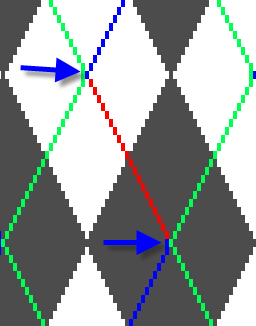
Exchange Colors of the Rhombuses
Exchange the colors of the diamonds in the preview of the Argyle dialog box.
- The
 option may not be active.
- 1
- Define the rhombuses.
 : Select temporarily a small size of the rhombus (e.g. 15) in order to recolor the embroidery stitches easier.
 - 2
- Select the replacing color in the Pattern Color palette.
- 3
- Click the color to be replaced in the preview.: You can adjust the zoom level with the slider to select the desired color.
- The original color is replaced by the selected color.
- 4
- Set up the rhombus size if necessary.
- 5
- Generate pattern element.
With Ctrl and click on a color you can replace this color in the entire pattern element.
You can restore the rhombus as defined by Reset colors.
The color of the ornamental stitch legs will be replaced from crossing to crossing.