Module groups
Various module groups are specified by Stoll.
These contain additional subgroups with modules, pattern elements and arrangements.
The following module groups are specified:
|
Module group |
Description |
Modules and pattern elements |
|---|---|---|
|
New Modules |
The link to a newly generated module in the database is automatically saved here. |
|
|
Lost & Found |
Modules lost due to database errors are saved in this module group during a database check. |
|
|
User |
For each user who also logs-on on the pattern workstation, the <Domain>\<User name> sub-group is automatically generated here. |
|
|
Starts |
The starts pre-produced by Stoll are located here in the Stoll sub-group. |
Starts; with/without comb; with/without elastic yarn; 1/2 systems; MG/standard; etc. |
|
Favorites (Module Bar) |
The subgroups contained in this module group will be displayed with the module links in the tab in the Modules toolbar. Thus, the content of the toolbar can be determined by the user. |
Cables; aran; petinet; structures |
|
Jacquard |
The jacquard generators and the jacquard modules are contained in this module group. |
Float, stripe, body, net, net 1x1, net 1x2, net 1x3, net relief |
|
Favorites Jacquard Editor |
The jacquard symbols for the symbol view are contained in this module group. |
Subgroups: |
|
Stoll |
This module group contains the module pre-produced by Stoll which you can use for positioning in the pattern. |
Modules and pattern elements for cable, aran, petinet, jacquard generators, 1x1 Technical, doubling etc. |
|
Technique |
The modules to be inserted in the pattern by the Technical Processing function |
Modules and module groups for Technical Processing |
|
k&w-Starts |
This module group contains the starts that you can select in the Insert/replace k&w start dialog box. |
Modules and module groups for starts for different knitted articles and for different machines. |
|
k&w Favorites |
The subgroups contained in this module group will be displayed with the module links in the tab in the Modules toolbar with k&w patterns. Thus, the content of the toolbar can be determined by the user. |
Cables; aran; petinet; structures |
|
knit and wear |
This module group contains the module pre-produced by Stoll which you can use in the k&w pattern. |
Modules for cable, aran, petinet etc. |
|
k&w arrangements |
This module group contains the k&w Arrangements pre-produced by Stoll. |
Sets of knitting cycles for sweater with inserted sleeve, sweater with French shoulder, sweater with raglan, slipover, waistcoat, cardigan |
|
k&w Technique |
The modules to be inserted in the k&w pattern by the technical processing function. |
Modules and module groups for Technical Processing |
 Tips:
Tips:
- If you accidentally delete a module group specified by Stoll, then you can re-import it. The export files are contained in the directory D:\STOLL\M1\EXPORT\MODULE .
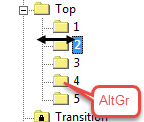
- Private module groups (without write protection
 ) can be sorted.
Move the module group pressing the AltGr key to the desired position.