Generate Step Module
Generate a step module:
- 1
- Run the function in the menu.
- The New Step module dialog box appears.
- 2
- Select a module from the Modules toolbar or the Module explorer and position it in an empty field of the dialog box.
- or -
Pull the module into the dialog box with Drag & Drop.
- The picture of the module appears in the field in which the module has been positioned. The module name is shown below the picture. The module width or module height in number of knitting rows is automatically entered in the related input field. This module consists of a maximum of 3 individual modules in a column. The starting module is inserted in the bottom row, the repetition module in the middle row and the end module in the top row. Only modules with a single pattern row are permissible.
You can position the modules in the dialog box diagonally from left to right or diagonally from right to left. If you have inserted a starting or end module, the direction is fixed. The locations in the dialog box where modules may still be inserted are specified in the dialog box. The following picture appears at the positions at which no module can be inserted: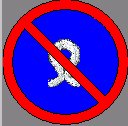 If you hold the cursor on the module in the dialog box, the module name will be displayed as well and additionally the size of the module. Here the first number indicates the number of needles of the module and the second number the number of pattern rows.
- 3
- Change the values in the input fields.
- or -
Leave the values as they are specified.
In the input fields you specify at what distances from each other the modules are to be inserted in the pattern during drawing. - 4
- Click on the OK button.
- The picture of the module appears as local module in the Modules toolbar. For this purpose the <Pattern name> entry in the list field must be selected. If no pattern was open when generating the step module, then a prompt appears asking whether the step module is to be saved to the module database. In this case the module appears in the Module explorer in the New modules module group.
The pictures of the step modules have the icon  in the lower right corner.