Drawing with combination module
Drawing with a combination module:
- 1
- Click on the desired module in the Modules toolbar or in the Module explorer.
- In the Drawing tool toolbar the icon
 is automatically active.
- 2
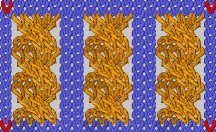
- Pull on a rectangular selection in the fabric
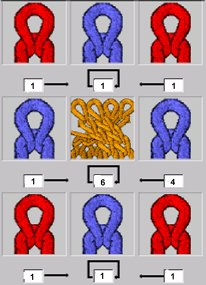
For a combination module you can set a horizontal distance between the individual modules.
- Horizontal repetition:
The modules in the center column of the dialog box are repeated several times depending on the selection. In the process, each row is considered independently taking the values for the horizontal distance into account. The modules in the left and right column are each only inserted once horizontally in the pattern. - Vertical repetition:
The modules in the center row of the dialog box are repeated vertically as often as they fit into the selection in dependence on the selection. In the process, each module is considered independently. The modules in the bottom and top row are each only inserted vertically in the pattern once and must have the same height.