Fair Isle narrowings (ShapeSizer k&w)
Enter the values for the Fair Isle narrowings on this page of the ShapeSizer.
Call up this page via the Fair Isle stepping page.
The settings of the previous page are displayed in the graphic:
|
Element |
Function |
|---|---|
|
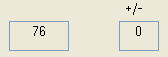
Specifications of the width at the end of the Fair Isle narrowings | |
|
left display field |
Display number of needles (width). |
|
right display field |
Display the remaining height (rows).
|
|
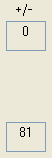
Specification of the height of the Fair Isle narrowings | |
|
Upper display field |
Display the remaining height (rows)
|
|
lower display field |
Display the actual number of rows in the height. |
|
Specification of the width at the start of the Fair Isle narrowings | |
|
Display field at the lower center |
Number of needles (width) |
In the table with the specifications on every narrowing step of the Fair Isle you can compensate the step heights and step widths individually.
With the Initialize... button you reset the values in the table to the settings of the previous page.
The buttons of the page:
|
Button |
Function |
|---|---|
|
< Back |
Go to the previous page. |
|
Save As... |
Save the ShapeSizer file (*.shz) with all its settings. |
|
Quit |
Close the ShapeSizer. |
|
Continue > |
Go to the next page. |