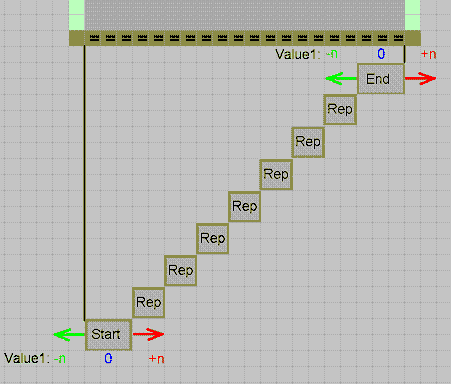
Meaning of value 1
Enter Value 1 in the tab of the dialog box. The Meaning of the entry depends on the module type.
With narrowing and widening modules the entry in the input field has the following meaning:
|
Input |
Meaning with fully fashion |
Meaning with k&w |
|---|---|---|
|
0 |
The module will be inserted side by side several times according to the narrowing width of the shape. |
Common narrowing of the layers. |
|
1 |
Module will be inserted only once in its complete module width. |
Separate narrowing of the layers. |
|
2 |
Module will be inserted twice in its complete module width. |
Separate narrowing of the layers. |
|
n |
Module will be inserted n times in its complete module width. |
|
With binding-off modules the entry in the input field has the following meaning:
|
Input |
Meaning |
|---|---|
|
0 |
The modules are positioned at the outer fabric edge. If there are no modules with other settings for the , then the module will be used at the cut-out as well. There should always be a module with the value 0. |
|
With negative values the modules are positioned within the fabric (cut out). | |
|
-1 |
The starting module from the step module (binding-off) will be set on position -1 at the end of the mark for binding-off (matches the symbol =). |
|
-2 |
The starting module from the step module (binding-off) will be set on position -2 at the end of the mark for binding-off (equivalent to the symbol =). |
|
-n |
The starting module from the step module (binding-off) will be set on position -n at the end of the mark for binding-off (matches the symbol =). |
|
With positive values the modules are positioned within the fabric (cut out). | |
|
1 |
The starting module from the step module (binding-off) will be set on position 1 at the end of the mark for binding-off (matches the symbol =). |
|
2 |
The starting module from the step module (binding-off) will be set on position 2 at the end of the mark for binding-off ( equivalent to the symbol =). |
|
n |
The starting module from the step module (binding-off) will be set on position n at the end of the mark for binding-off (matches the symbol =). |