Example Pattern in Stoll Patternshop
Pattern No. 1610021 http://patternshop.stoll.com/shop/pattern/3692/1610021
How to create the 5 colored stripe patter for CMS 502 HP + E 12 with border fixation
- 1
- Draw the stripe pattern as basic pattern and position the shape.
- 2
- Open the Yarn Field.
- 3
- Confirm the message with OK.
- 4
- Scroll to the start of the V-neck in the Yarn Field Allocation dialog box.
 All yarn carriers of the doubled allocated tracks 3-6 must be positioned at the right of the knitting area.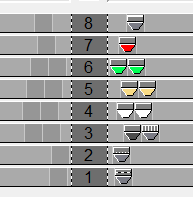
- 5
- Put the yarn carrier of the rib thread (4) in to the magazine.
- 6
- Select the first yarn field (white) at the left of the V-neck in the yarn field view.
Put the selected yarn carrier from the magazine to track 4 as yarn carrier 4A.
Set starting direction to the right.
Activate .
. - 7
- Select the second yarn field (black) at the left of the V-neck in the yarn field view.
Put the selected yarn carrier from the magazine to track 3 as yarn carrier 3A.
Set starting direction to the right.
Activate . - 8
- Select the third yarn field (yellow) at the left of the V-neck in the yarn field view.
Put the selected yarn carrier from the magazine to track 5 as yarn carrier 5A.
Set starting direction to the right.
Activate . - 9
- Select the ninth yarn field (green) at the left of the V-neck in the yarn field view.
Put the selected yarn carrier from the magazine to track 6 as yarn carrier 6A.
Set starting direction to the right.
Activate . - 10
- Put the other yarn carriers of the colors white, black, yellow and green on the tracks 3-6 as yarn carriersB.
- 11
- Put the red yarn carrier on track 7.
- 12
- Define the yarn carrier for the rib-thread as 3B.
- 13
- Set 2 systems for all yarn carrier fields between waistband and V-neck excepting the red one (7B).
- 14
- Select the modules Left 1 and Right 1 for the default cell of border fixation and set the Number of rows between border fixations to 10.

- 15
- Overwrite both of last rows of the shape with color 205 in order to knit the protection rows at the left and right with another yarn carrier.