k&w File Managing and Basic Rules of Generating
Shape parts are necessary for generating a k&w file. The generation of shape parts is carried out in the shape editor.
Shape parts of a k&w file
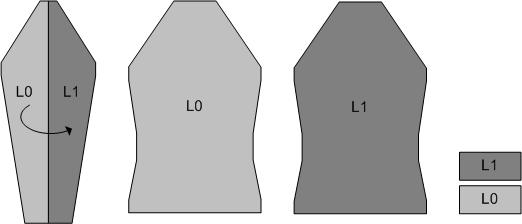
- Sleeve (the shape contains both layers, L0 and L1)
- Front (front layer L0)
- Back (back layer L1)
- Collar (can be loaded for layer L0 or L1)
All shape parts of the k&w file must be saved in a common directory.
Rules for the basic shape of a k&w file
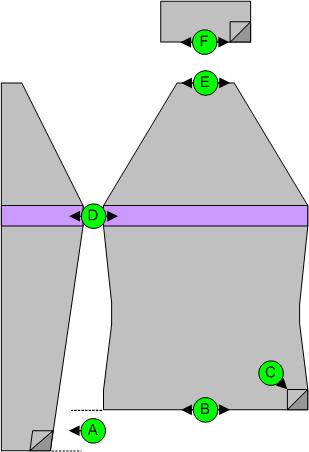
|
Dimension |
Conditions / requirements |
|---|---|
|
A |
Length difference between sleeve and body must be even-numbered, starting with 30% length difference applies short sleeve with residual yarn |
|
B |
Starting width for sleeve and body as desired |
|
C |
same shape width for front and back |
|
D |
In the sleeve-body connection area (6 rows) may not take place any widening or narrowing. |
|
E |
End width for sleeve and body as desired |
|
F |
Collar width results from the end width of sleeve and body |
Narrowing and widening in k&w
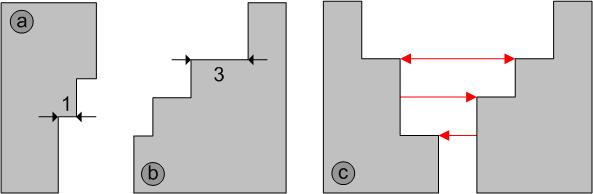
|
Image |
Shape attribute |
Conditions / requirements |
|---|---|---|
|
a |
Widening in sleeve or body |
a maximum of 1 stitch after a least 2 rows. |
|
b |
Automatic narrowing |
a maximum of up to 3 stitches, layer L1 and L0 will be narrowed together |
|
c |
Narrowings in body and sleeve |
Possible racked or at the same height |