k&w Options for Cut-out
You can make pattern related settings in the Configuration k&w dialog box before cutting out.
- 1
- Cut out the shape with
 in the Steps of Processing toolbar.
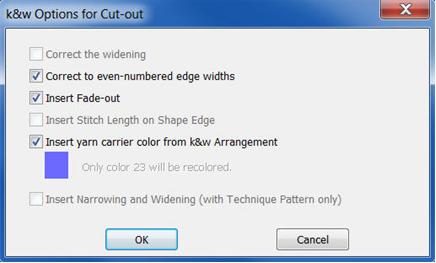
- The k&w Options for Cut out dialog box appears.
|
Options |
|
Function |
|---|---|---|
|
Correct the widening |
|
No correction when .
The correction takes place when expanding |
|
Correct to even-numbered edge widths |
|
Activated automatically with odd-numbered edge widths. |
|
|
With even-numbered edge widths | |
|
Insert Fade-out |
|
The specifications in the tab of the shape attributes will be entered. |
|
|
The specifications in the tab of the shape attributes will not be entered. | |
|
Insert Stitch Length on Shape Edge |
|
Selection only active, if settings for stitch length on shape edge are present in the shape. |
|
|
Specifications are inserted | |
|
|
Specifications are not inserted | |
|
Insert yarn carrier color from the k&w arrangement |
|
The yarn carrier colors specified for the different shape elements in the k&w Arrangement are applied to the pattern. |
|
|
The yarn carrier colors specified for the different shape elements in the k&w Arrangement are not applied to the pattern.
The basic color #23 (blue) is preserved in the different shape elements. | |
|
Inserting Narrowing and Widening |
|
Only active with M1 k&w patterns. |
 :
: .
.

- 1
- Confirm the settings in the dialog box with OK.
- The Insert/Replace k&w Start dialog box appears.