k&w Correction of Widening
The shape attribute Standard widening, is entered and automatically corrected in the pattern with the Processing step  .
.
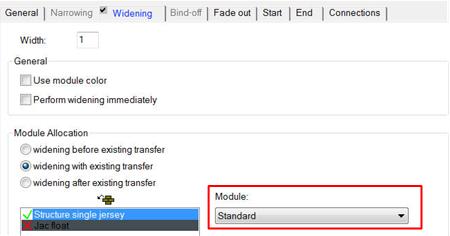
- 1
- For this, the dialog k&w correction of the widening opens up automatically when expanding.
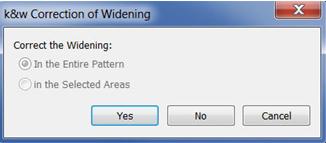
- 2
- Confirm the request for correcting the widening.
|
k&w Correction of Widening | |
|---|---|
|
Confirmation |
Function |
|
Yes |
The modules of the standard widening are entered in the entire pattern, the shape edges of the widening are corrected. |
|
No |
The modules of the standard widening are not entered in the pattern, no correction of shape edges is performed. |
|
Cancel |
The Processing step |

Standard widening
- 1
- According to knitting technique or optical points of view the k&w correction of widening is to be performed.
- 2
- As the standard widening for the knitting layer L0 and L1 is different, the widening step of the shape must be distributed and newly allocated.
Widening step before correction
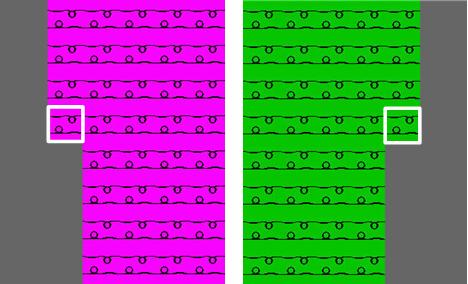
- The widening step is carried out depending on the shape for both knitting layers at the same position.
- No widening module allocated to the knitting layer L1 or L0.
Widening step after correction
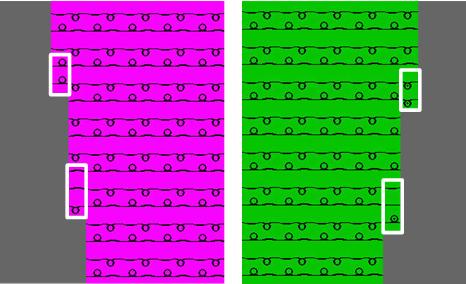
- The widening step is distributed onto layers L0 and L1.
- The corresponding widening modules are automatically allocated to the pattern.