Shape Editor
The Shape Editor:
- 1
- Call up the M1plus Shape Editor via the / menu.
- The dialog box will be opened.
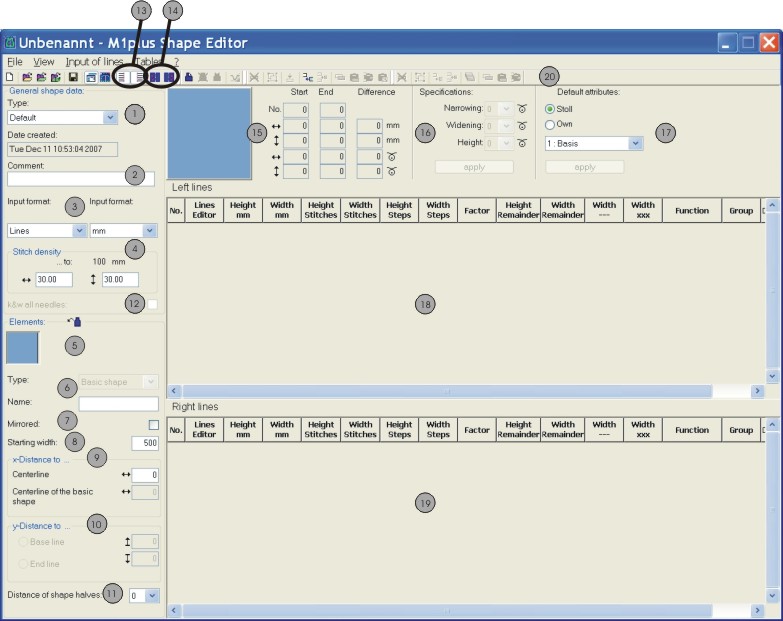
|
No. |
Label |
Function | |
|---|---|---|---|
|
1 |
Type |
Type of shape - Standard or k&w | |
|
2 |
Comment |
Notation on the shape (for information only). | |
|
3 |
Input format / |
Possibilities to generate a shape: | |
|
Lines |
Input format in the tables: Millimeters or inches | ||
|
Stitches |
Display format in the tables | ||
|
Steps | |||
|
4 |
Enter stitch density corresponding to the selected display format | ||
|
5 |
|
Individual display of all the generated elements | |
|
|
Generate new element | ||
|
|
Delete element | ||
|
|
Display of all elements in a graphic | ||
|
6 |
Type of elements:
| ||
|
7 |
Mirrored: | ||
|
|
Shape symmetrical | ||
|
|
Shape asymmetrical | ||
|
8 |
Entire starting width of a shape | ||
|
9 |
x-Distance to ... | ||
|
Centerline |
Horizontal distance of the element halves to the centre axis | ||
|
Centerline of the basic shape |
Horizontal distance of the entire element in relation to the centre axis of the basic element | ||
|
10 |
y-Distance to ... | ||
|
Base line |
Vertical distance of an element to the base line | ||
|
End line |
Vertical distance of an element to the end line | ||
|
11 |
Distance between shape halves: | ||
|
12 |
Generate k&w shape with all needles (for CMS – MC with additional beds) | ||
|
13 |
|
Display table for the left shape half | |
|
|
Display table for the right shape half | ||
|
14 |
|
Display table for the left markings | |
|
|
Display table for the right markings | ||
|
15 |
Graphic display and coordinates of the selected element | ||
|
16 |
Specification for stepping in case of narrowing and widening edges. | ||
|
17 |
|
Default attributes for the shape edges (simple allocation of attributes) | |
|
Stoll |
Selection list with STOLL Default attributes for narrowing, widening and fade-out depending upon the machine type. | ||
|
Private |
Selection list with self-generated default attributes | ||
|
18 |
Display of the table with left edge lines | ||
|
19 |
Display of the table with right edge lines | ||
|
20 |
Toolbar for processing the tables | ||


