Generate or modify a Sintral function
I. Generate a Sintral function or modify an imported Sintral file:
- 1
- Open the M1plus main program.
- 2
- Open the UltraEdit-32 editor wihtout content via / .
- or -
Open an imported Sintral file by double click. - 3
- Generate your own Sintral function in the Sintral Editor.
- or -
Modify the imported Sintral file. - 4
- Save the modified Sintral function via / or by the
 icon.
icon.
- A file with the .sin extension will be save to any desired directory.
II. Rules to generate or modify a Sintral function:
- Additional row must have CC at the start of the line
- No line numbers (e.g. Sirix line numbers)
- Write values for stitch lengths, take down and carriage speed directly into the Sintral
- No IF condition (e.g. stitch length in relation to the machine gauge)
- Allocate the corresponding technical yarn color number to the yarn carriers in the yarn carrier home position
Example:
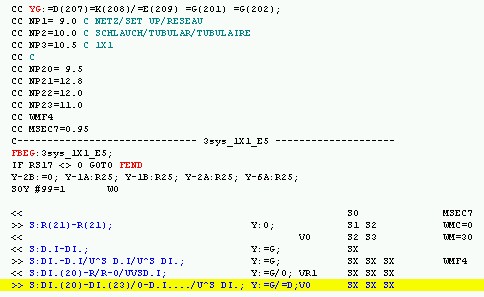
A Sintral function of your own will not be cheked by the Technical Processing.
The inserted Sintral function will be checked by the Sintral Check.