Create the shape in the M1plus Shape Editor
Create shapes for Fair Isle Narrowing:
- 1
- Via the / menu call up the M1plus Shape Editor dialog box and create a new shape with
 .
. - 2
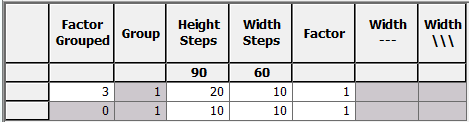
- Enter the values for the element in the table.
Basic element Front

- 3
- Create a line editor for the edge line No. 3
- 4
- Click on the edge line No. 3 of the Front basic element in the menu.
- 5
- In the tab set Narrowing under Function.
- 6
- In the tab activate multi-step under General.
- 7
- Select in the Module allocation
- 8
- In the picklist select the Fair Isle + Doubling_Stitch v module.
- 9
- Save the shape via the / menu.
- 10
- Close the M1plus Shape Editor with
 .
.