Generate Color Arrangement
With the help of the Color Arrangement, the yarn carriers are combined and in the areas with inverse plating, the corresponding plating colors (2 plating colors for each area) are allocated.
I. Generating Color Arrangement and entering it:
- 1
- In the basic pattern additional yarn colors have to be drawn-in as search colors for the CA.
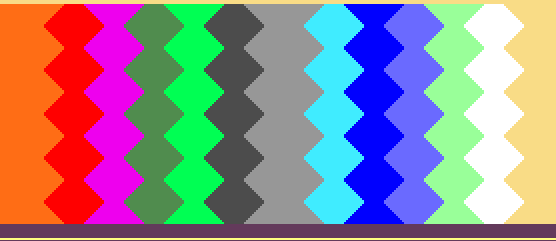
- 2
- Select the pattern without the last two rows in height.
- 3
- Click the
 button.
- The Color Arrangement Editor will be opened.
- 4
- Modify the Color Arrangement:
- Adapt the knitting sequence
- In the two areas of the Inverse Plating
- Combining the yarn carriers in the Intarsia areas
- Draw-in the plating colors instead of the yarn colors In the processing area.
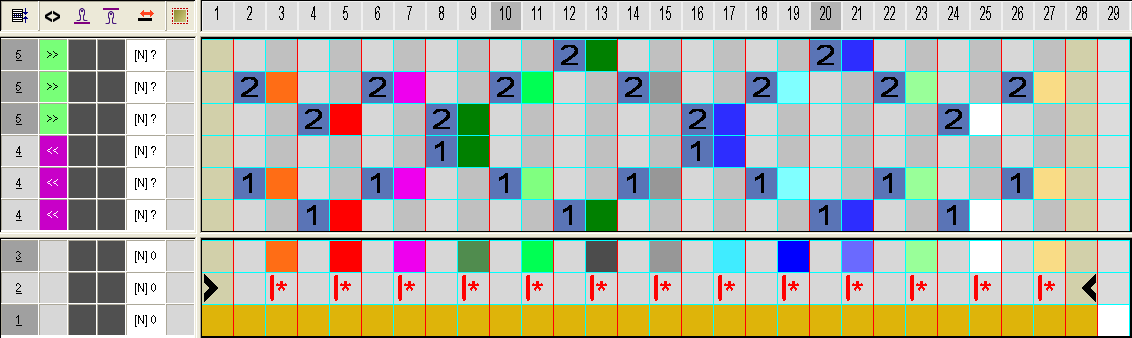
- 5
- Close the Color Arrangement Editor with
 .
.
- The CA is saved and the color entry is entered in the
 control column.
II. Variant when generating the Color Arrangement:
Instead of yarn colors, the plating colors are used as search colors in the Color Arrangement.
- For each area with inverse plating there must be created also an additional plating color.
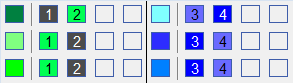
- 1
- In the basic pattern the plating colors have to be drawn-in as search colors for the CA.
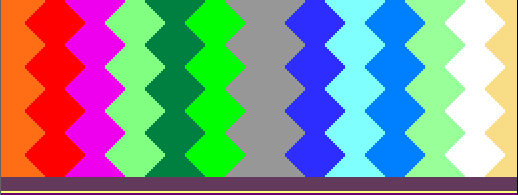
- 2
- Generate Color Arrangement.
- The plating colors are used as search colors in the CA.
- 3
- Modify the Color Arrangement:
- Adapt the knitting sequence
- In the two areas of the Inverse Plating
- Combining the yarn carriers in the Intarsia areas
- 4
- Close the Color Arrangement Editor with .
- 5
- The CA is saved and the color entry is entered in the control column.