CA #1: Weft yarn and basic yarn are of the same thickness
I. Generating Color Arrangement #1 and entering it:
- 1
- Select the 'circle' motif in the entire height.
- 2
- Click the
 button.
- The Color Arrangement Editor will be opened.
- 3
- Modify the Color Arrangement:
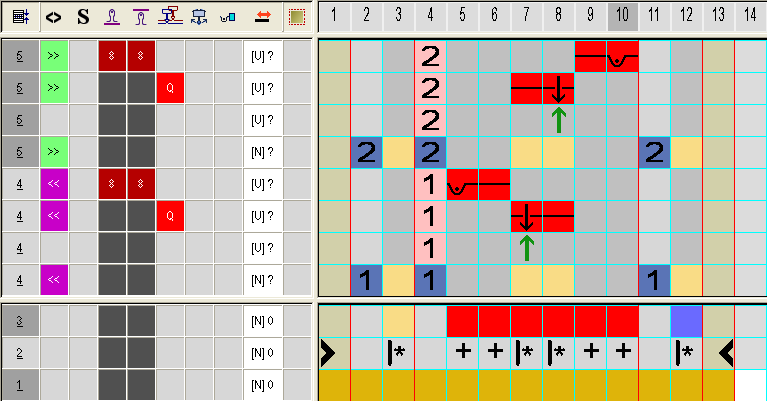
- Insert additional columns in the color segment with the #7 search color (red) for border processing the motif (without function in the search area).
- Change the following in the executing area:
- Change the knitting sequence (the #31 yarn color knits continuously).
- alter the #23 search color into the #31 yarn color.
- Insert additional rows for transferring and draw-in transfer symbol.
- In the additional rows with yarn color #7, draw-in the Weft yarn / Transferring to the front with float needle action according to the desired structure.
- Insert structure / needle actions with yarn color #7 in the columns for border binding.
- In the
 column for the weft yarn carrier insert
  .
.
II. Needle actions for the weft yarn:
|
Needle action |
Meaning |
|---|---|
|
|
The yarn carrier (weft yarn) runs before the knitting system with the float needle action and in the following knitting system, transfer to the back is performed. |
|
|
The yarn carrier (weft yarn) runs before the knitting system with the float needle action and in the following knitting system, transfer to the front is performed. |
|
|
The yarn carrier (weft yarn) runs before the knitting system with the float needle action and in the following knitting system, cast-off at the front needle bed is performed. |
|
|
The yarn carrier (weft yarn) runs before the knitting system with the float needle action and in the following knitting system, cast-off in the rear needle bed is performed. |
|
|
|
 +
+ +
+ +
+ +
+ : These needle actions cannot be combined with the knitting needle action in the same knitting row.
III. Apply the symbols for the weft yarn in the CA:
- In the column for the weft yarn carrier insert .
|
Symbol |
Meaning |
|---|---|
|
|
Possible definition for a yarn carrier as weft yarn carrier
|
 dialog box
- 1
- Close the Color Arrangement Editor with
 .
.
- The CA is saved and the color entry is entered in the
 control column.