Create Pattern
I. Generate new pattern:
- 1
- Select the / menu.
- or -
Click the icon.
icon.
- The New Pattern dialog box appears.
- 2
- Enter the desired name at Pattern name.
- 3
- Under Machine use
 to open the Select machine dialog box:
- Select the tab or .
- 4
- Make settings:
- Machine type: ADF 530-32 W
- Gauge / Needle hook gauge
- 5
- Select Basic pattern (pattern without shape) and .
- 6
- Define the pattern size and the basic knitting mode.
- 7
- Select the start from Stoll with protection yarn / Standard / 1 System / without elastic thread / Transition loose row / Tubular.
- 8
- Confirm the dialog box with the Generate Design Pattern button.
- The new pattern appears in the symbol view.
II. Possible settings with the MC attributes:
Presser Foot
When selecting the machine ADF 530 32 W, the presser foot is automatically activated as available cam box function in the MC attributes.
The type of usage of the presser foot is controlled via the program.
- Weft yarn presser foot W
- Knitting-in presser footE
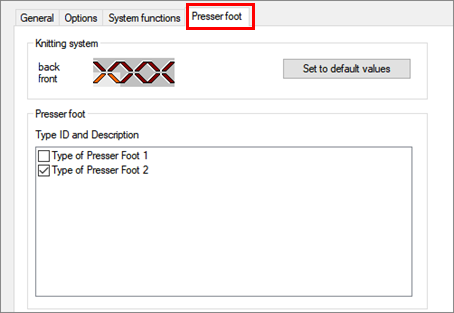
Settings in the Presser Foot tab
- Setting related to the system is possible
- Activate / deactivate presser foot
- Assignment of the different types of presser feet (mix of type 1 + 2)
|
| ||
Presser Foot Type 1 | Presser foot with flat groove |
|
Presser Foot Type 2 | Presser foot with deep groove (Standard) |
|