Function / programming of the weave-in presser foot
Weft yarn presser foot
The weft yarn presser foot is activated / deactivated in the M1plus via the control column. This control column  can be called up in the design pattern as well as in the Color Arrangement.
I. Use of the weft yarn presser foot:
- The weft yarn presser foot is always active leading the knitting system
- Weft yarn carrier - activated weft yarn presser foot - knitting yarn carrier in the following knitting system
- The weft yarn presser foot is only active in the area, where the following knitting system is in action.
- The weft yarn presser foot is activated before the first knitting needle and deactivated after the last knitting needle.
Attention!
The Float needle action is not a knitting information!
Meaning that the weft yarn presser foot gets active starting with the first needle with a needle action as stitch or transferring.
Result: The float needle action does not activate the weft yarn presser foot!
- In the areas, where the weft yarn presser foot is activated and deactivated, no yarn carriers may be positioned.
Activating and deactivating the weft yarn presser foot:
The weft yarn presser foot is activated / deactivated independently of the carriage speed.
II. >How YDopt works:
|
| |
1 | Parking area for the yarn carriers that are knitting in the pattern row
|
2 | Parking position (waiting area) for the momentarily non knitting yarn carriers
|
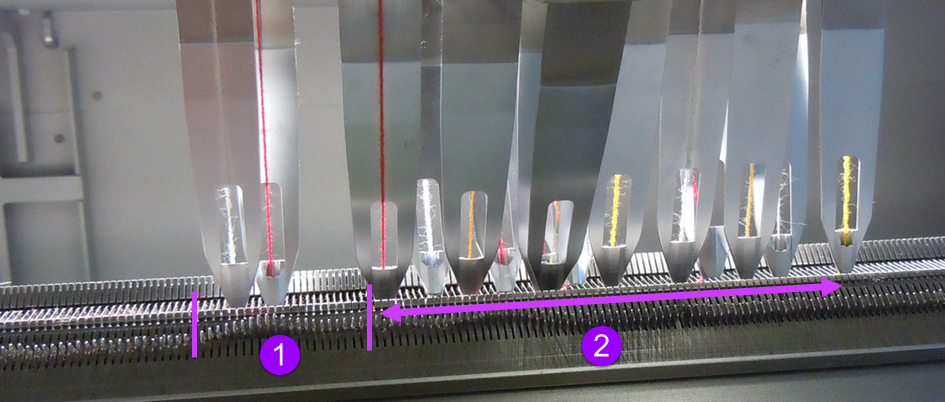
 : The yarn carriers are positioned staggered
- The yarn carriers are positioned staggered with a wide distance (wating position) in relation to the fabric selvedge.
- The required yarn carriers are taken out of the waiting position and start knitting.
- While knitting, the active yarn carrier receives a new parking position and will be positioned much closer to the fabric selvedge.
The parking positions will be calculated in an optimized way by YDopt. - After its last knitting row, the active yarn carrier is returned to the waiting position.
- Subsequently, knitting yarn carrier is taken out of the waiting position and also positioned at the fabric selvedge with YDopt.
III. Yarn carrier parking positions at the fabric selvedge - YDopt
Programming only with YDopt
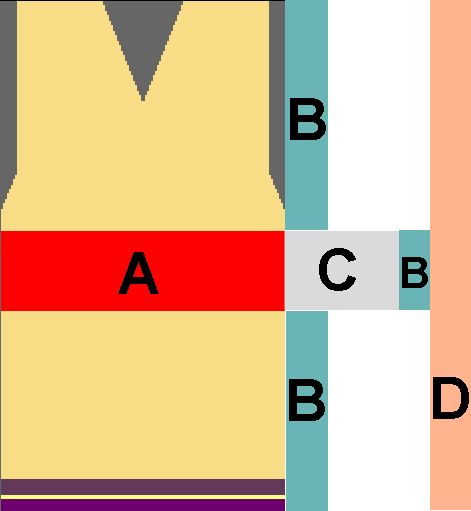
The use of YDopt is mandatory (automatic staggering of the yarn carriers at the fabric selvedge) when programming with weft yarn presser feet. Here, the necessary parking positions of the yarn carriers in the corresponding technical rows are taken into account by the M1plus and entered in the Sintral.
|
A | Area with working weft yarn presser foot (weft yarn presser foot active) |
B | Area for staggering the used yarn carriers with YDopt
|
C | Area for activating / deactivating the weft yarn presser foot |
D | Waiting area for the momentarily non knitting yarn carriers
|