Border Processing for Selective Plating
Selective Plating
Several yarn carriers are used within on area with selective plating. Meaning all yarn carriers has to be placed optimally to knitting rows during knitting. This requests a border processing / correction of the motif.
I. Border processing of the motif:
You have to process the border in the basic pattern  .
.
Caution:
The border processing cannot be undone after technical processing of the pattern  /
/  !
!
- 1
- Run the dialog box with the function in the menu.
|
| Function | ||||
|---|---|---|---|---|---|
Border Processing for Selective Plating | |||||
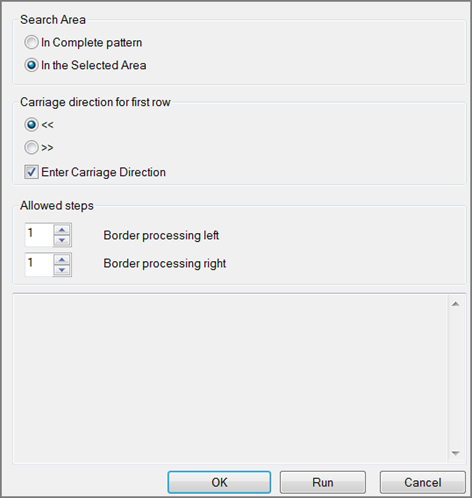
Search Area | |||||
|
| In complete pattern | Edit the border processing of the areas within the whole pattern. | ||
| Within the selected area | Edit the border processing of the areas within the selection. | |||
| |||||
| Carriage direction for first row | ||||
| Carriage direction for the first row in the area of selective plating to the left | ||||
| Carriage direction for the first row in the area of selective plating to the right | ||||
| Switching carriage directions for the left and right border will be inserted into the pattern. | ||||
Allowed Stepping | |||||
| Border processing left | Setting for allowed stepping by needles at the left border | |||
| Border processing right | Setting for allowed stepping by needles at the right border | |||
| |||||
1 | Allowed stepping of one needle | ||||
2 | Selvedge correction with an automatically created new plating color
| ||||

 : Multiple selection is possible.
 Enter Carriage Direction
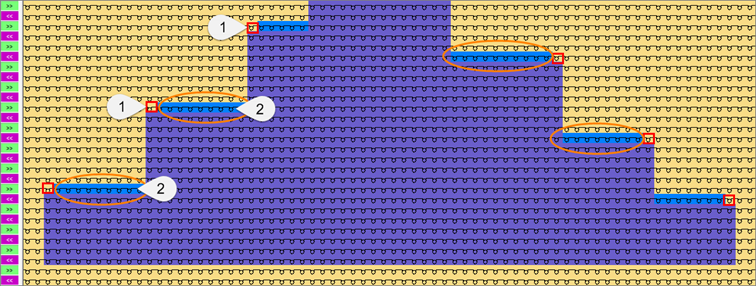

For processing correctly the selvedge correction ensure:
1. When creating the plating color, the color for the selective plating must be entered in the first position in the dialog box.
2. This way the basic color is entered in the second position.