Generate Color Arrangement
Weft yarn insert and DJ plating is done by the Color Arrangement and the half Milano is knit by an additional yarn carrier (yarn color). The weave-in device is activated by the  control column.
I. Generating Color Arrangement and entering it:
- 1
- Select the pattern in the entire height.
- 2
- Click the
 button.
- The Color Arrangement Editor will be opened.
- 3
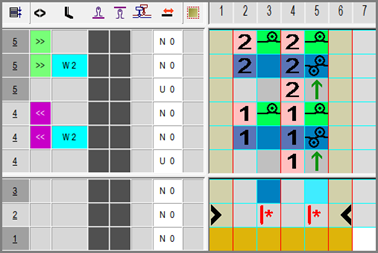
- Modify the Color Arrangement:
- Insert additional rows for half Milano
- Select any desired additional yarn color and insert it.
- Insert the Stitch without transfer binding element.
- For the additional yarn color (search color):
- Insert transferring rows.
- For plating color and half Milano color: Insert the Stitch without transfer binding element.
- Enter the
 symbol for in the control column .
 - Enter the system setting into the
 control column.
 - Weft yarn carrier runs before system S1
- 4
- Close the Color Arrangement Editor with
 .
.
- The CA is saved and the color entry is entered in the
 control column.