Create Intarsia Pattern
Create pattern:
- 1
- Generate a new pattern.
- 2
- Select Pattern without shape and .
- 3
- Click the
 icon of the Drawing Tools toolbar.
- The Argyle dialog box appears.
- 4
- Make for example the following settings in the Argyle dialog box for the motif:
- In the section select the setting .
- For the under
 enter the value 43 for the diamond width.
 : With symmetrical diamonds the width has to be odd-numbered.
 - Under :
- With :
 2 +
2 +  3
3 - With : -1 + 0
- Select Diamond Type1 in the list box under .
- Select the 1:2 ratio under .
- In the section:
- Activate
 .
. - Select the Stitch_Float jacquard under
- Select the Interruption of ornamental stitch jacquard at
- Replace the colors #1 (left side) and #9 (right-hand side) by the basic color #31 in the preview pane.
Result: 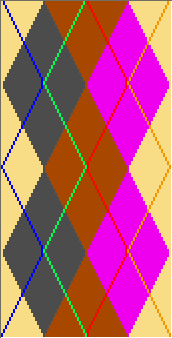
- 5
- Press the Create pattern element key.
- The pattern element is created and sticks to the cursor.
- 6
- Draw-in the pattern element into the basic pattern.
- The pattern element will be saved in the Module toolbar under Local modules and pattern elements in the Module Explorer of Pattern.