Working with the Carriage Speed Table
I. Call up the carriage speed table and change the entry:
- Carry out changes in the Basic Pattern
 state of pattern.
- 1
- Place the cursor on the control column for the carriage speed
 in the Symbol View and press the right mouse button.
- The Carriage Speed context menu with the used carriage speeds and the favorites appears.
- 2
- Place the cursor on the changed entry and press the right mouse button.
- 3
- Click in the context menu.
- or -
Click in the context menu.
- The Carriage speed table appears.
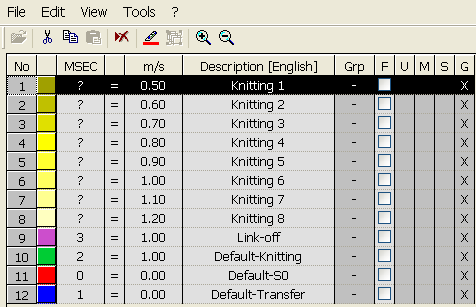
Designations in the Carriage Speed table
|
Column |
Display |
|---|---|
|
No. |
Consecutive numbering of the entries |
|
Color |
Color of entry |
|
MSEC |
Index for indirect allocation of the carriage speed |
|
m/s |
Carriage speed value in use |
|
Description |
Name for the entry |
|
Group (Grp) |
Entries that are combined to form a group |
|
Status column |
Display the status of the entry |