Modifying the 'Global Pattern Parameters' File
Important pattern data are saved as Stoll default in these files.
-
globalparameters.mdv
File for all machines that do not need any specific parameters. -
globalparameters_B.mdv
File for all machines with belt take-down that do not need any specific parameters. -
globalparameters_xxx.mdv / globalparameters_xxx_B.mdv
Files for special machine types (classification number) that need machine specific parameters.
I. Create a private file for global pattern parameters:
- 1
- With
 open the M1plus.
 - 2
- Call up the / menu.
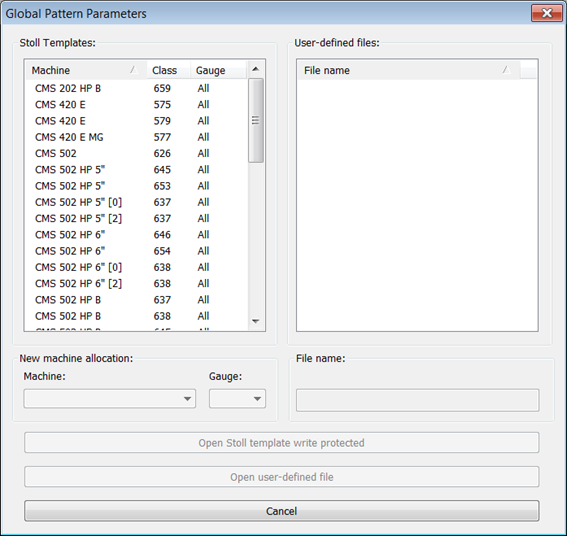
- The Global Pattern Parameters dialog is displayed.
|
| |
|---|---|---|
New machine allocation: | Machine | Selection of the machine type (classification) for the (private) file to be newly created with your own specifications |
Gauge | Selection of the machine gauge for gauge dependent files | |
File name | Enter the name for the Private file | |
Key | Open the selected Stoll template as write-protected file. | |
Key Create New File | Creating a copy of the selected Stoll template with a new file name
| |
Open user-defined file button | Opening a selected file from the list under | |
 : The copy is saved with the specified file name in the Private folder under the
 - 3
- Select the desired template for creating your one file under .
- 4
- Select another machine type and / or gauge if necessary.
- 5
- Enter new file name.
- 6
- Press the Create New File key.
- The Stoll template is copied and saved under the new file name in the Private folder under D:/Stoll/M1plus/<Version>/ConfigData/Private.
- 7
- Select the private file in the section.
- 8
- Click the Open user-defined file button.
- The dialog box with the file name is opened.
|
GlobalParameters | ||
|---|---|---|
Configuration | Default | Sintral |
Knitting Areas | ||
Transfer | ||
Intarsia | ||
Comb, Clamping | ||
More Settings | ||
k&w | Settings in Configuration for the knit and wear mode | |
| Stitch length table | The corresponding tables are displayed. |
Fabric take-down table | ||
Auxiliary Take-down Table | ||
Belt take-down | ||
Carriage speed table | ||
Racking Correction Table | ||
Sintral Functions | ||
NPS Table | ||
PNP Table | ||
YPI Table | ||
II. Carry out changes in Configuration:
- 1
- In the dialog box open the Configuration dialog with the Standard button.
- 2
- Select the desired tab and make changes.
- 3
- Save the changed settings in the private file underD:/Stoll/M1plus/<Version>/ConfigData/Private by clicking Apply or OK.
- The private files with the changes are retained in the Private folder in case of software installation.
- The files in the Private folder are directly selected and used during the pattern creation.
- During the software installation, a backup of the Private folder will be generated:
D:/Stoll/M1plus/<Version>/ConfigDataBackup/ Private.
III. Changing the values in the tables of the different Pattern Parameters:
- 1
- Open the desired table and carry out the changes.
- 2
- Close the table with
 .
.
IV. Add a new entry in the tables of the different Pattern Parameters:
- 1
- Open the desired table.
- 2
- Select via the context menu of the tables.
- A new entry is added.
- 3
- Allocate values and descriptions to the new entries.
- 4
- Close the table with .
V. Save the changes in the file:
- 1
- Close the dialog box with .
- The query appears.
- 2
- Confirm the query with Yes.
- The changes will be saved under the D:/Stoll/M1plus/<Versionnummer>/ConfigData/Private/xxx.mdv path.