Draw color jacquard with different reverse sides
Draw the Jacquard motif:
- 1
- Draw different multi-color motifs with Yarn or Yarn carrier colors
- or -
Select pattern elements in the Module Explorer under Stoll / Pattern elements / MT-Jacquard and insert them. - 2
- Select the rows above the area of the Jacquard.
- 3
- Call up the Jacquards dialog box via the / menu.
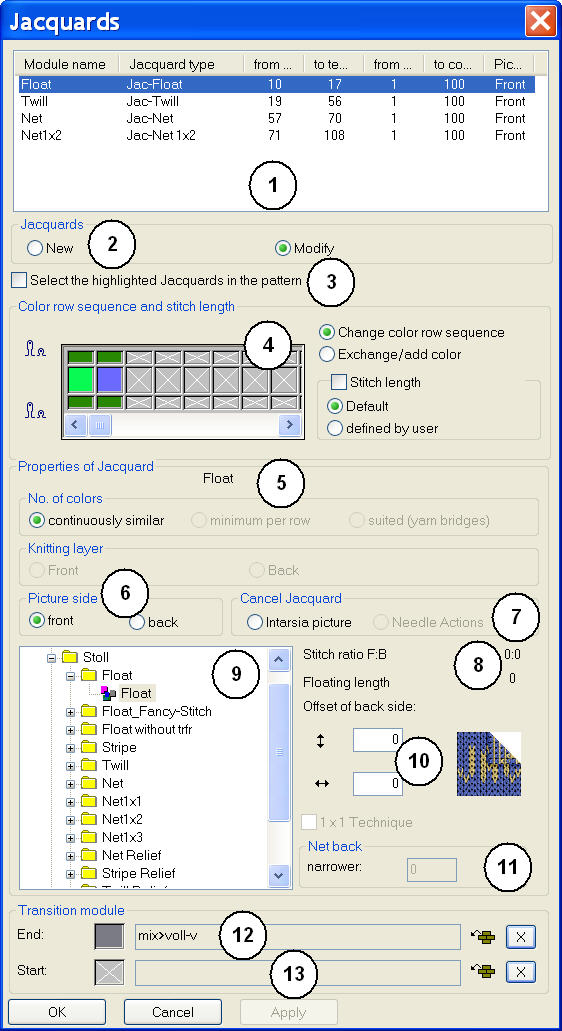
|
No. |
Meaning | ||
|---|---|---|---|
|
1 |
List of the inserted Jacquard generators | ||
|
2 |
|
Insert a new Jacquard generator into an area. | |
|
|
Change the inserted Jacquard generator | ||
|
3 |
|
The Jacquard selected in the list (1) will not be displayed as selection in the pattern. | |
|
|
The Jacquard selected in the list (1) will be displayed as selection in the pattern. | ||
|
4 |
Change of the color sequence and stitch length | ||
|
5 |
| ||
|
|
All colors of the selection will be knitted uniformly according to the color sequence. | ||
|
|
Only the colors, which are present in the respective row will be processed. | ||
|
|
Insert of yarn bridges with Intarsia | ||
|
6 |
Select Jacquard picture side front or back | ||
|
7 |
| ||
|
|
Remove the Jacquard generator. | ||
|
|
Remove the Jacquard generator. | ||
|
8 |
| ||
|
9 |
Pick list of the Jacquard generators | ||
|
10 |
Shift the starting point of the Jacquard back
| ||
|
11 |
Narrow the width of the ladder back of the selected jacquard area.
| ||
|
12 |
End module for the transition at the end of a Jacquard | ||
|
13 |
Start module for the transition at the beginning of a Jacquard | ||


 : Not in the Design Mode
- 4
- Select the desired Jacquard generator and insert it via Apply.
- 5
- Proceed in the same way in the other Jacquard areas.
- 6
- Close the dialog box with OK.
Module Support
You can open the Module Support for the selected Jacquard module with the ? button.