Keypad
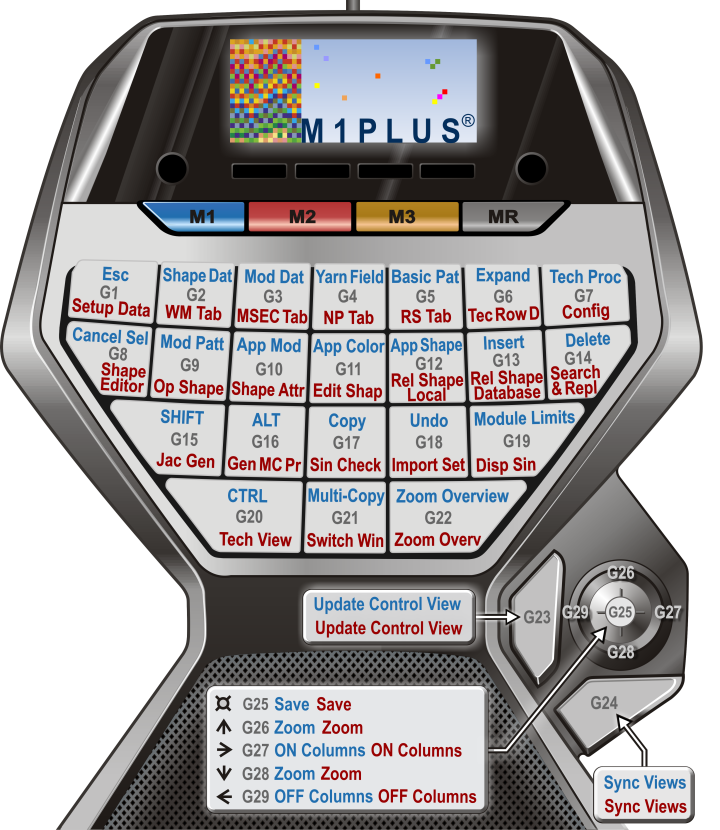
Use the Stoll default assignment:
\DVD_M1plus_5.5.033\5.5.033_MAIN_BL001\util\Keypad
Stoll default key assignment:
Key combinations at the keypad | Function | Key combination of the keyboard | |
|---|---|---|---|
M key | G key |
|
|
M 1 | G1 | ESC | ESC |
G2 | Display shape symbols and shape edges | F2 | |
G3 | Module / Module Explorer of Database | F3 | |
G4 | Open the Yarn Field View dialog box | F4 | |
G5 | Steps of processing / Load basic pattern | Ctrl+↑+F10 | |
G6 | Steps of Processing / Expanding entire pattern | F9 | |
G7 | Steps of Processing / Start Technical Processing | F10 | |
G8 | Selection / Cancel Selection | Ctrl+D | |
G9 | Module / Module Explorer of Pattern | Ctrl+F3 | |
G10 | Toolbar Drawing Tools / Apply module | F5 | |
G11 | Toolbar Drawing Tools / Apply color | F6 | |
G12 | Drawing Tools toolbar / Apply shape attributes | F7 | |
G13 | Paste | Insert | |
G14 | Remove | Del | |
G15 | Shift (↑ key) | ↑ | |
G16 | Alt key | Alt | |
G17 | Copy | Ctrl+C | |
G18 | Display Module Limits | Ctrl+Alt+M | |
G19 | Confirm input ↲ | ↲ | |
G20 | Ctrl (key) | Ctrl | |
G21 | Multi Copy | C | |
G22 | Zoom to Overview | Z | |
G23 | Update control view | E | |
G24 | Synchronize the views. | X | |
Press G25 (Joystick) down | File / Save | Ctrl+S | |
G26 (Joystick) ↑ | Larger zoom level | + (keypad) | |
G27 (Joystick) ↓ | Smaller zoom level | - (keypad) | |
G28 (Joystick) ← | Hide Control Columns | / (keypad) | |
G29 (Joystick) → | Show Control Columns | * (keypad) | |
M 2 | G1 | Setup2... | Ctrl+2 |
G2 | Pattern Parameters / Fabric Take-Down... | Ctrl+W | |
G3 | Pattern Parameters / Carriage Speed... | Ctrl+Alt+V | |
G4 | Pattern Parameters / Stitch Length... | Ctrl+L | |
G5 | Pattern Parameters / Cycle... | Ctrl+R | |
G6 | Pattern Parameters / Technical Row Data | Ctrl+F9 | |
G7 | Pattern Parameters / Configuration | Shift+F9 | |
G8 | Shape / Shape editor (Generate/edit shapes)... | Shift+F11 | |
G9 | Shape / Open and Position Shape | Alt+F2 | |
G10 | Shape Attributes | - - | |
G11 | Shape / Edit Shape | -- | |
G12 | Reload Shape (local modules) | -- | |
G13 | Reload Shape (modules of database) | -- | |
G14 | Find & replace | Ctrl+H | |
G15 | Edit / Generate or edit Jacquard | Ctrl+F4 | |
G16 | Generate MC Program. | F11 | |
G17 | MC Program / Run the Sintral Check | Ctrl+F11 | |
G18 | MC Program / Import MC Setup / Setup File... | Alt+F12 | |
G19 | Sintral / Show Sintral | Alt+F10 | |
G20 | View / Open New Technical View | Ctrl+T | |
G21 | Change the view | Ctrl+Tab | |
G22 | Zoom to Overview | Z | |
G23 | Update control view | E | |
G24 | Synchronize the views. | X | |
Press G25 (Joystick) down | File / Save | Ctrl+S | |
G25 (Joystick) ↑ | Larger zoom level | + (keypad) | |
G26 (Joystick) ↓ | Smaller zoom level | - (keypad) | |
G27 (Joystick) ← | Hide Control Columns | / (keypad) | |
G25 (Joystick) → | Show Control Columns | * (keypad) | |
 : Does not affect divided windows of the same view.