Manual changes in the basic pattern for the knitting-in presser foot
Switching on the knitting-in presser foot:
For switching on the knitting-in presser foot, a needle action is necessary!
Knit-in/knit-out with float  is not recognized as needle action.
Result: The knitting-in presser foot will only be activated with the first needle with  .
.
I. Knitting-in the yarn carriers:
- 1
- Select the last row of the start.
- 2
- Insert the desired number of empty rows:
- 3
- With the needle action Float draw-in the knitting-in of the yarn carriers with the desired order.
- 4
- Manually draw-in the needle action
 Tuck at the rear without transfer in each knitting-in row before the beginning of the color field, to activate the knitting-in presser foot.
 - 5
- For these rows enter the
 symbol in the
  control column.
|
| |
1 | Needle action for activating the knitting-in presser foot earlier. |

II. Moving and feeding of the yarn carriers
- 1
- Select the last row of the first color field.
- 2
- Insert the desired number of empty rows:
- 3
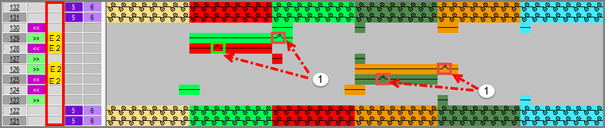
- With the needle action Float draw-in the moving and feeding of the yarn carriers with the desired order.
- 4
- Manually draw-in the needle action Tuck at the rear without transfer in the row with feeding, to activate the knitting-in presser foot.
- 5
- For the rows with Feeding enter the symbol in the control column.
- 6
- In the
 control column enter the required carriage directions.
|
| |
1 | Rows for feeding of the yarn carriers with needle action for activating the knitting-in presser foot earlier. |
| In the rows with the needle action |

III. Knitting-out the yarn carriers:
- 1
- Select the last row at the end of the color field.
- 2
- Insert the desired number of empty rows:
- 3
- With the needle action Float draw-in the knitting-out of the yarn carriers with the desired order.
- 4
- Manually draw-in the needle action Tuck at the rear without transfer in the knitting-out rows at the fabric selvedge, to activate the knitting-in presser foot and to lock the thread.
- 5
- For the rows with Feeding enter the symbol in the control column.
- 6
- In the control column enter the required carriage directions.
|
| |
1 | Needle action for activating the knitting-in presser foot when locking. |
