Knitting Technique
- Plush requires two knitting systems. Therefore, a machine with at least three systems is necessary to carry out all the knitting functions as knitting a comb start or rib, or to transfer.
- The cams are mounted in the two systems at the rear center and right, in order to use the front knitting systems for clamping and cutting without restrictions.
- Only the left system can transfer from or to the rear.
|
Knitting process: | ||
|---|---|---|
1 |
| Insert binding thread without stitch formation |
2 |
| Insert the plush thread and knit together with the binding thread |
3 |
| Cast-off |
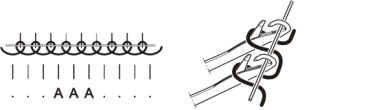
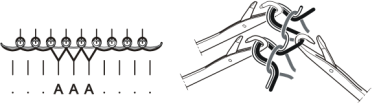
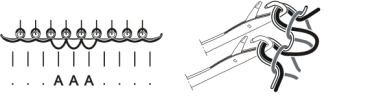
Included in a carriage stroke, the process looks like this:
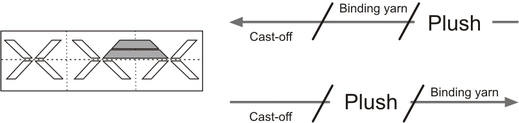
The two systems in which the plush cams are built-in must be considered as one unit.
This means: If a needle is selected in the first system, it must also be selected in the second system. It is not possible to select another needle in the second system, as the needle butt can no longer enter the cam channel. This would lead to needle breakage.
The converted knitting systems cannot use the presser foot.
Create plush pattern on pattern workstation M1 and M1plus
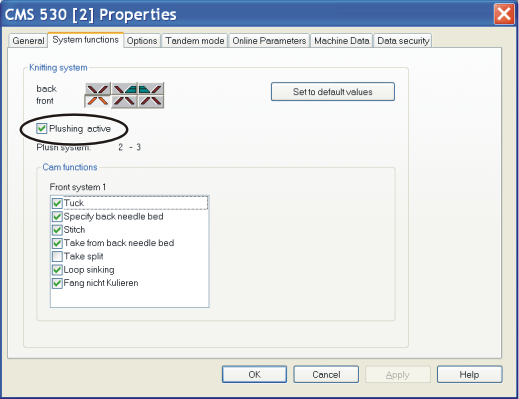
Change the machine properties in the machine explorer before creating a plush pattern. You can only change the properties on an .
(Path: Tools -> Machine Explorer-> Select Own Machine -> Tab )
- 1
- Activate check box in field .
- 2
- A message appears and asks you whether the cam box functions for the plush knitting are to be adapted. Confirm this with Ok.
- When generating a pattern, the knitting function is carried out in the knitting systems which have been planned for this.
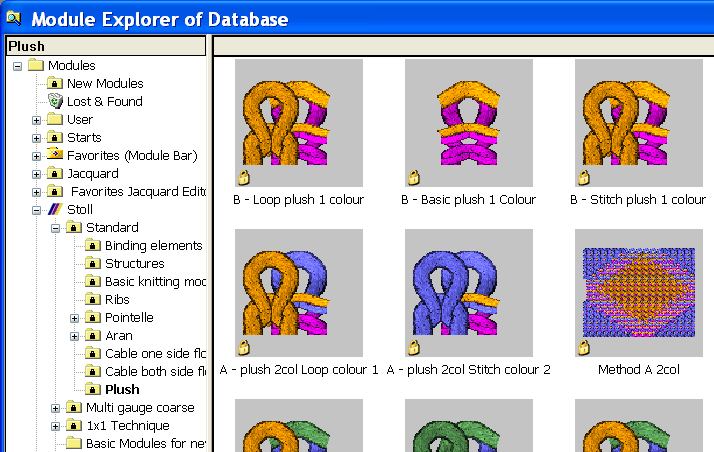
For generating a plush pattern, you can use the plush modules
(Path: Module -> Module Explorer Database -> Modules -> Stoll -> Standard -> Plush)
The converted knitting systems cannot use the presser foot.
Recommendation
When generating the plush pattern, ensure that an additional knitting row is inserted after each plush row in order to avoid an accumulation of plush loops. This also ensures a reliable casting-off of the plush loops.