Edit New Shape
I. Specify the stepping in the width and height of narrowing and widening:
- 1
- Select line in the table.
- 2
- Select the desired narrowing or widening width and the step height under .
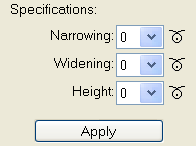
|
List field |
Function |
|---|---|
|
|
Setting of the step in the width for narrowing. |
|
|
Setting of the step in the width for narrowing. |
|
|
Setting of the step in the height. |
- 3
- Press the Apply key.
- Settings will be applied to the selected lines.
II. Select the line function in the Line Editor:
- 1
- Click in the column with the corresponding line number using the left mouse button.
- The Line editor line xx dialog box will be opened.
Line functions in the line editor:
|
|
Function |
|---|---|
|
|
Calculation of the stepping for a line that runs straight. |
|
|
Calculation of the stepping for a line that is rounded towards the bottom. |
|
|
Calculation of the stepping for a line that is rounded towards the top. |


- 2
- Select the desired line function for the selected edge.
- or -
Create your own table with values in the Line Editor.