Generate own binding/ knots modules
I. Generate own modules:
- 1
- Call up the New Module dialog box via the / / menu.
- 2
- Define the following in the dialog box:
- Module name
- Type of Pattern
- Width and height of the module
- Basic structure of the module
- 3
- Close the dialog box with OK.
- The Module Editor appears.
- 4
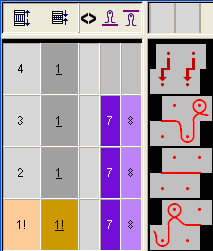
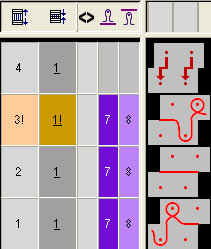
- Create the knitting sequence for your own knots in the Module Editor.
- Module height odd-numbered
- Group the technical rows to one pattern row
- Insert reference rows
|
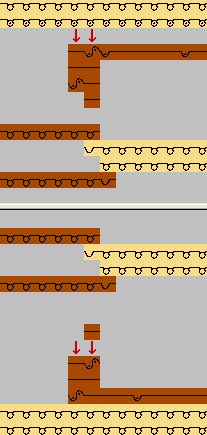
Module as knots for knitting-in |
Module as knots for knitting-out |
|---|---|
|
|
|
- 5
- Close the Module Editor with
 .
.
- The module will be saved.
II. Allocate own modules:
- 1
- Click on the
 icon in the Pattern Presentation toolbar for opening the yarn field view.
 - 2
- Select the yarn field in the
 column of the yarn field table.
 - 3
- Drag and drop the module knots from the Module Explorer Database to the selected row of the
 column.
 - 4
- Call up the context menu and select the desired procedure.
- Define module as knot
- Define module as binding
- 5
- Click on the inserted module in order to transfer the selecting.
Result after expanding: