Generate Color Arrangement for Devoré- Intarsia
- 1
- Select two pattern rows of the intarsia motif via the row selection bar.
- 2
- Click the
 icon in the Default toolbar.
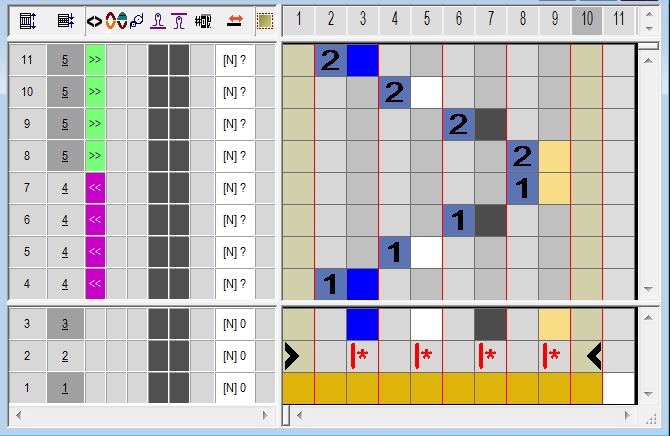
- The color sequence of the selection will be displayed in the Color Arrangement Editor.
- 3
- Insert the corresponding number of rows and columns in the CA.
- 4
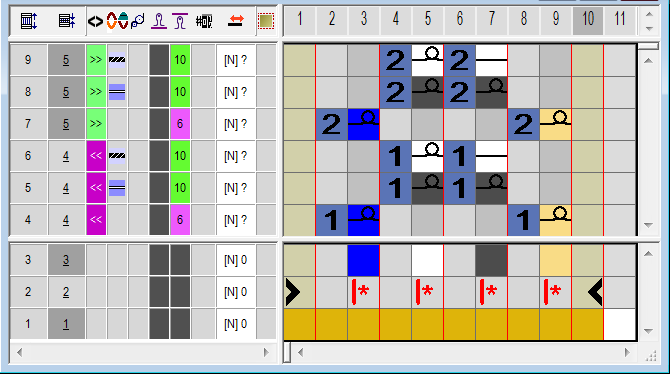
- Draw-in the devoré knit knitting sequence with the corresponding colors and needle actions in the inserted rows and columns.
- 5
- Draw-in the symbols for the binding- and motif thread in the control column .
Symbol | Function |
|---|---|
| Use the system function binding thread |
| Use the system function motif thread. |


- 6
- Enter stitch length for devoré.
- 7
- Close the CA Editor with X.
- 8
- In the pattern, draw-in the Color Arrangement in the
 control column of the pattern in the height of the intarsia motif.