Additional settings k&w tab
I. Open fabric take-down
Number of narrowings until the next opening of the fabric take-down.
|
Value |
Meaning |
|---|---|
|
0 |
Function is not active |
|
n |
Fabric take-down is briefly opened after n narrowing operations to relieve the fabric |
II. Yarn carriers
The setting is recommended for structured patterns, thus knitting systems are freed up for transfer.
Not necessary for single jersey patterns, as no transfer of layers is carried-out here.
- Checkbox deactivated (default setting)
Result: The yarn carriers for sleeve/body/sleeve will not be combined in the entire pattern. Meaning the yarn carriers will knit by separate systems.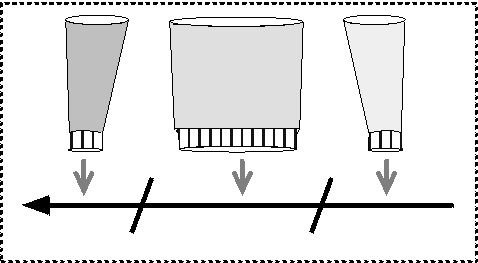
- Checkbox activated
Result: The yarn carriers for sleeve/body/sleeve will be combined in the entire pattern. Meaning knit by one system.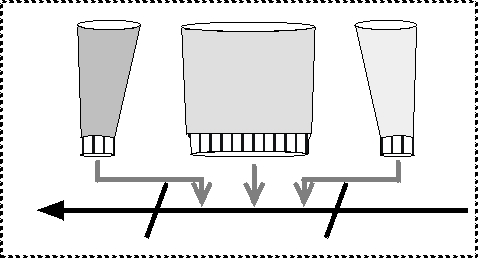
|
Option |
Function |
|---|---|
|
Standard |
Allocation of the yarn carriers for optimized productivity |
|
Secure yarn insertion at color widening |
Allocation of the yarn carriers for the secure yarn insertion at widenings of intarsia color fields |
III. Combine yarn carriers within an area:
If the yarn carriers are not to be combined over the entire pattern but only by area, this is to be carried out by generating Color Arrangements.
- The basic pattern is generated and the shape is positioned.
- 1
- Switch the symbol view [basic] to k&w presentation with narrowing with the
 key.
key. - 2
- Display the control columns Color Arrangement
 and k&w Arrangement
  .
. - 3
- Generate a row selection above the desired area.
- 4
- In the context menu of the control column Color Arrangement select .
- The automatically generated Color Arrangements are entered in the control column and saved in the module bar under local Color Arrangements.
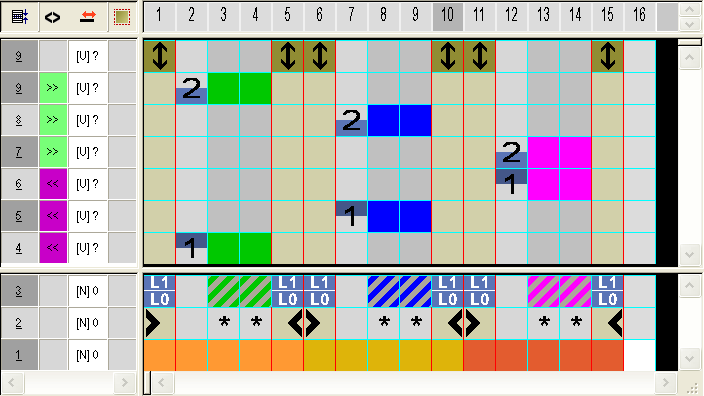
- 5
- Edit Color Arrangement
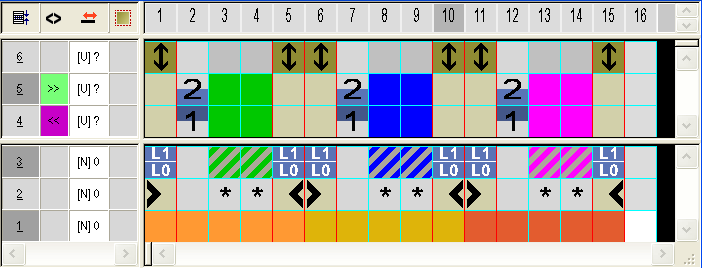
- 6
- Complete the pattern.
- The yarn carriers are combined during the Technical Processing.