ShapeSizer: Generate sizes - Grading
|
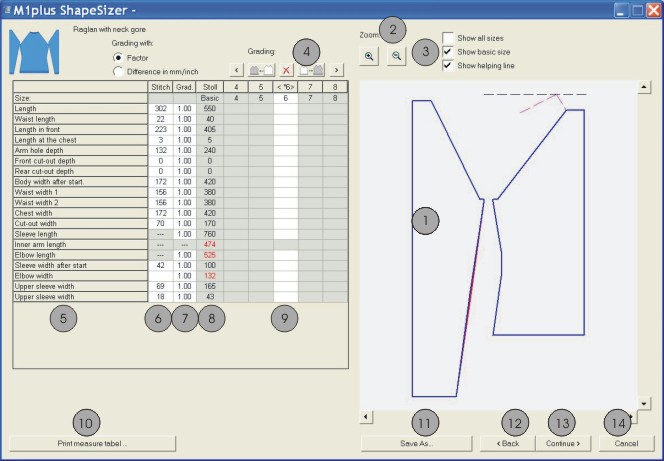
No. |
Function | |
|---|---|---|
|
1 |
Graphic presentation of the shape | |
|
2 |
Decrease or increase the graphic display with zoom | |
|
3 |
Display the graphic presentation of the sizes | |
|
4 |
Calculate the sizes based on the grading factor | |
|
|
Call-up the previous column of the measure table | |
|
|
Calculate the next smaller size | |
|
|
Delete the values in the active column | |
|
|
Calculate the next larger size | |
|
|
Call-up the following column of the measure table | |
|
5 |
List of the shape edge lines and their name | |
|
6 |
Measures of the shape in stitches referring to the selected size. | |
|
7 |
Grading factor in %, i.e. the change from one size to the next size in percent. | |
|
8 |
Measures of the shape of the basic size. These values cannot be changed. | |
|
9 |
Measures of the basic size in the < * 6 > column: | |
|
10 |
Display and print the measure table of all sizes | |
|
11 |
Save size table as *.shz file | |
|
12 |
Switch to the previous dialog window | |
|
13 |
Switch to the next dialog window | |
|
14 |
Close the ShapeSizer | |



If you generate the other sizes based on the basic size < * 6 >, then these shape attributes will be applied.
- 1
- Change to the next dialog window with the Continue> button.