Module Properties: Technique
tab
-
Settings for racking
Settings are necessary for modules of the following module groups: - Technique / Widening
- Technique / Narrowing
|
Max. allowed racking </> |
Unlimited |
Value |
|---|---|---|
|
|
|
0 |
|
|
n (any desired) |


Specifications for both racking directions are always necessary with narrowing and widening modules.
- Jacquard
The settings for Jacquard are only available for Jacquard modules.
|
Element |
Meaning |
|---|---|
|
Relief jacquard |
Activate for the Relief knitting mode. |
|
Number of colors |
Specify when generating the Jacquard module. |
|
Stitch ratio |
The stitch ratio of front to back can be specified. |
|
Picture side |
Specify picture side at front or back. |
|
Max. floating length |
Display the maximum floating length. |
|
Ladder Back |
Specify the knitting mode when generating Jacquard modules. |
- General settings
|
Element |
Meaning | |
|---|---|---|
|
1x1 Transfer allowed |
|
Allow 1x1 transferring for this module. |
|
|
Do not allow 1x1 transferring for this module. | |
|
Surroundings transfer allowed: |
|
Allow transferring surrounding for this module. |
|
|
Do not allow transferring surrounding for this module. | |
|
Casting-off + Transfer permitted |
|
Allow to combine casting-off and transferring for this module. |
|
|
Do not allow to combine casting-off and transferring for this module. | |
|
Knitting mode |
Define the knitting mode of the module. | |
- General module attributes
Putting in the direction
|
Input |
Meaning |
|---|---|
|
> |
|
|
< |
|
Entry for Value1:
The container module is determined by Value1 and by the direction.
- with technical container modules for narrowing and widening.
|
Value1 |
Meaning |
|---|---|
|
0 |
The module will be inserted side by side several times according to the narrowing width of the shape. |
|
1 |
Module will be inserted only once in its complete module width. |
|
2 |
Module will be inserted twice in its complete module width. |
|
n |
Module will be inserted n-times in its complete module width. |
 : If the module is wider than the narrowing width, then the module will be inserted independently of its own module width only partly.
- with technical container modules for binding-off (stepping module)
|
Value1 |
Meaning |
|---|---|
|
0 |
The technical container module will be used at the outer fabric edge and / or at the neckline.
|
|
| |
|
Value<> 0 |
The technical container module will be positioned within the fabric (neckline) |
|
- n |
The technical container module will be positioned at the left of the neckline on the binding-off markings (= symbol).
|
|
+ n |
The technical container module will be positioned at the right of the neckline on the binding-off markings (= symbol).
|
The module, first read by the M1plus, will be inserted in the neckline if there are more one technical container modules with = +/- n in the module group.
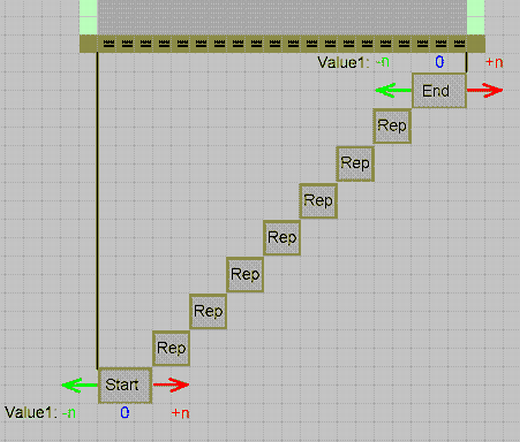
- with the elements in use in a technical container module for binding-off (stepping module)
|
Value1 |
Meaning |
|---|---|
|
0 |
Positioning of the start / end module on the binding-off markings (= symbol) |
|
- n |
Moving the position to the left |
|
+ n |
Moving the position to the right |
|
| |
|
Start and end module within the technical container module (Step module) | |
|
| |
Entry for Value 2:
- with technical container modules for narrowing and widening.
|
Input |
Meaning |
|---|---|
|
|
In general: If you want to use different narrowing modules at one fabric edge then you have to define different edges in the shape editor or different edge colors in the shape view.
|
|
| |
|
1001 |
First module, which will be inserted at the edge.
|
|
1002 |
Second module, which will be inserted at the edge. |
|
1003 |
Third module, which will be inserted at the edge. |
|
n |
n. Module, which will be inserted at the edge. |
- For TC-R machines only: with technical container modules for narrowing and widening.
|
Input |
Meaning |
|---|---|
|
|
In general: The distance between left and right shape edge within the cut-out is checked according to this value. There have to be two module with different values. |
|
Example | |
|
- 2 |
The module is inserted with a distance of less than 2 needles from the shape edge (opening) by the value - 2. |
|
+ 2 |
The module is inserted with a distance of 2 or more needles from the shape edge (opening) by the value 2. |