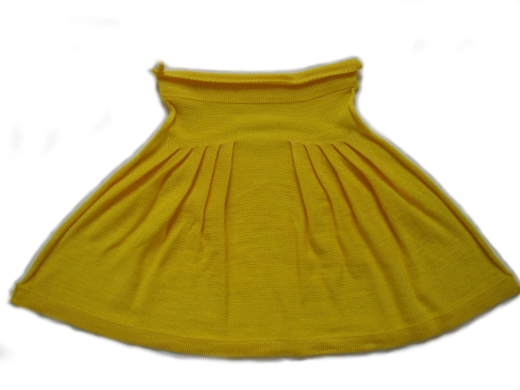
Version 2: Skirt with plissee
With this variant the pleats are worked starting in the center of the pattern, directly neighboring and without intermediate knitting.
I. Generate pattern and shape for a plissee skirt:
- 1
- Generate a New pattern via / menu bar.
- 2
- Select machine type.
- 3
- Select Basic pattern (pattern without shape) and .
- 4
- Set pattern size and select the Front stitch basic pattern.
- 5
- Select the start Tubular with draw thread end for the beginning.
- 6
- Confirm the settings with Generate Design Pattern.
II. Create shape:
- 1
- Call up the via the / Shape Editor (Generate or Edit Shapes)... menu.
- The dialog box will be opened.
- 2
- Generate a new shape in the shp format via / .
- or -
Click the icon.
icon. - 3
- Create a element:
- The checkbox is activated.
Example:
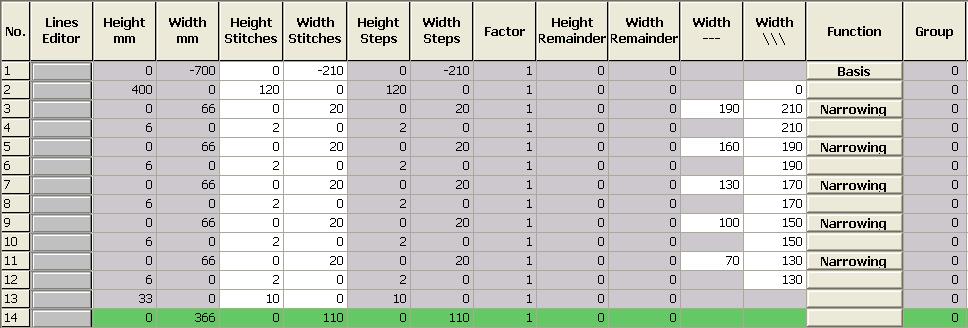
- Total knitting width of 420 needles
- Plissee module 20 needles wide
- Plissee with 10 needles overlapping
Basic element:
- 4
- Allocate narrowing and fading out to the edge lines:
|
edge lines |
tab |
Tab |
Tab |
|---|---|---|---|
|
3, 5, 7, 9, 11 |
|
Module: |
Plissee |
|
4, 6, 8, 10, 12 |
|
Module: |
|
- 5
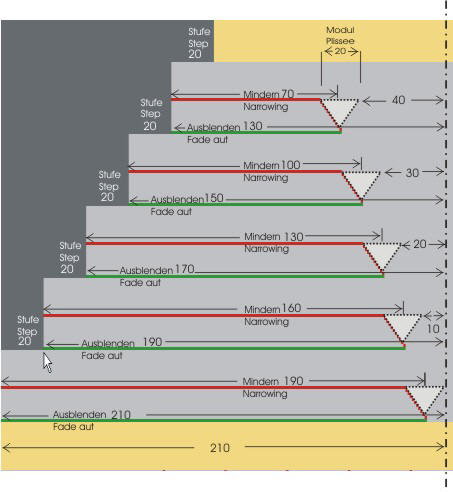
- Enter the value 210 in the shape edge no.3 in the column
- A module with the width of 20 needles will be inserted for plissee.
- 6
- Enter the value 190 in the column in order to place the module at the right position.
- The module will be inserted 190 needles to right from the left edge.
The step width is 20. Therefore, the right-most needle of the module is located exactly in the pattern center on needle 210.
- 7
- Call-up the shape attributes of this shape edge.
- 8
- Allocate the No needle action module from the Module Explorer of Database under Stoll / Basic pattern to the Structure single jersey knitting mode.
- 9
- Call-up the shape attribute of this shape edge.
- 10
- Select the Plissee module for Structure single jersey.
- 11
- Define a higher stepping as the narrowing width (step 20) for the edge line under .
- 12
- Enter the value 190 in the shape edge no. 5 in the column
- 13
- Enter the value 160 in the column.
- The module is inserted 160 needles to right of the left edge. This way the most-right needle of the module is located with a distance of 10 from the pattern center.
- 14
- Define the same attributes for the other shape edges no. 7, 9 and 11 and complete the shape table.
- 15
- Allocate the No needle action module from the Module Explorer of Database under Stoll / Basic pattern to the shape edges no. 4,6,8,10 and 12 by fading-out the Structure single jersey knitting mode.
- 16
- Save the shape via the / or menu.
- The shape will be saved in the shp format.
- 17
- Close the M1plus Shape Editor with
 .
.
Presentation of the fading-out and narrowing distances
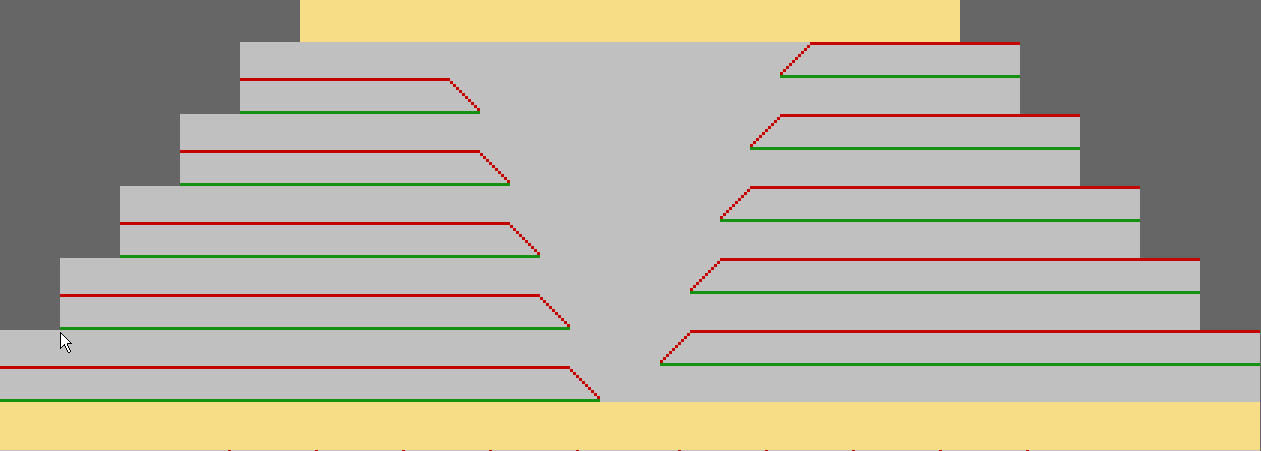
Overview presentation for plissee transferring
II. Placing the shape in the pattern:
- 1
- Load shape via / .
- The Open dialog box will be displayed.
- 2
- Specify the path and select the desired shape in the shp format.
- 3
- Click the Open button.
- The shape is laid on the pattern.