Create a pattern and draw the motif
I. Generate pattern without shape
- 1
- Select / from the menu bar.
- or -
Click on the symbol.
 - 2
- Enter a Pattern name.
- 3
- Select the machine type, setup type and gauge.
- 4
- Select Basic pattern (pattern without shape) and .
- 5
- Set pattern size and select the Front stitch basic knitting mode.
- 6
- Select a start.
- 7
- Confirm the settings with Generate Design Pattern.
- The Symbol view [Basic] will be opened.
II. Draw the motif.
- 1
- Select elements from needle actions and Module Explorer of Database toolbar and create the motif.
Module selection | Module Symbol View |
|---|---|
Rear Stitch with Transfer |
|
Cable 3x3> |
|
Cable 3X3< |
|

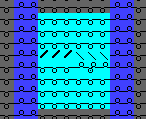
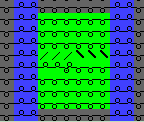
Example for the motif:
- Presentation by module color