k&w Arrangement Editor
I. Use of the editor:
- Modifying an existing k&w Arrangement
- Generating a new k&w Arrangement
The information of a k&w Arrangement are transferred to the pattern during the Cutting out processing step.
II. Task of a k&w Arrangement:
The k&w Arrangements control the knitting sequence of the yarn carriers and the shape modifications in the shape parts.
III. Call-up the k&w Arrangement Editor:
- 1
- Call up the k&w Arrangement Editor via the / / menu.
- The Properties of: <module-name> dialog box appears.
- 2
- Enter a name for the k&w Arrangement under .
- 3
- Specify a color for the k&w Arrangement under .
- 4
- Confirm entries with OK.
- The k&w Arrangement Editor appears.
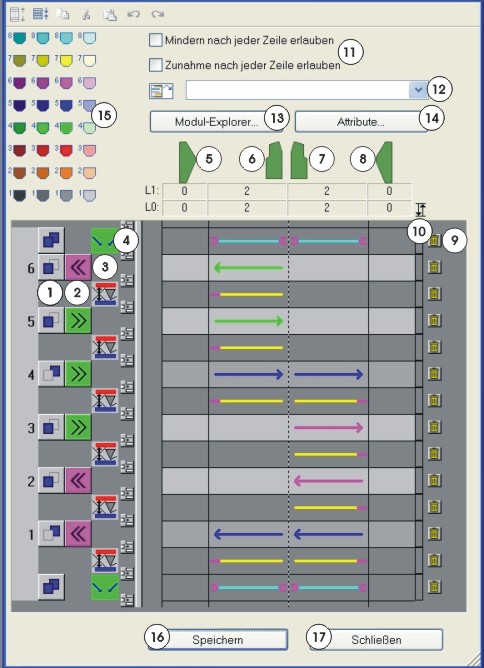
|
No. |
Presentation |
Meaning | |
|---|---|---|---|
|
|
|
Display pattern and additional rows. | |
|
|
Display pattern rows. | ||
|
|
Copy one or more selected rows into the paste buffer. | ||
|
|
Cut one or more selected rows into the paste buffer. | ||
|
|
Insert rows from the paste buffer via the last selected row.
| ||
|
|
Undo the last action. | ||
|
|
Restore the undone action. | ||
|
1 |
Definition of layers | ||
|
|
Back layer (L1) | ||
|
|
Front layer (L0) | ||
|
|
Both layers (L0 + L1) | ||
|
2 |
|
Define the direction of the carriage. | |
|
| |||
|
3 |
Display for additional rows |
Display icon for additional rows.
Positions can be defined with additional rows, e.g. if left narrowing may occur on a specific side of the body part. Symbols for the additional rows. | |
|
4 |
|
Insert a row. | |
|
5 |
|
Status information on the knitting zone: For the areas, the current number of knitting rows is displayed for the layer L0 and layer L1 respectively. | |
|
6 |
| ||
|
7 |
| ||
|
8 |
| ||
|
9 |
|
Delete rows. | |
|
10 |
Button for cycles |
Display cycles with two colors.
| |
|
11 |
|
|
Narrowing or widening after each line is not allowed. |
|
|
Narrowing or widening after each line is allowed. | ||
|
12 |
List field with Drag & Drop symbol
|
Allocate Color Arrangement from the Modules toolbar with Drag & Drop. | |
|
13 |
Module Explorer |
Open Module Explorer of Database | |
|
14 |
Attributes |
Open k&w Arrangement Attributes dialog box. Entry of attributes in order to use the k&w Arrangement in the Shapewizard. | |
|
15 |
Table of yarn carrier colors |
Select a yarn carrier color and allocate it to a row.
Yarn carrier colors in the Stoll k&w Arrangements:
| |
|
16 |
Save |
Save k&w Arrangement. | |
|
17 |
Close |
Close the dialog box. | |


 : If no row is selected, the rows are inserted before the first row.


 = yarn carrier 4 at the right
 = yarn carrier 5 at the right
 = yarn carrier 6 at the right
Further possibilities to call up the k&w Arrangement Editor:
- double-click the selected k&w Arrangement in the Module Explorer.
- click the function in the context menu of a selected k&w Arrangement in the Module Explorer.
- double-click the selected k&w Arrangement in the Module toolbar.