Yarn field table in the Yarn Field Allocation dialog box
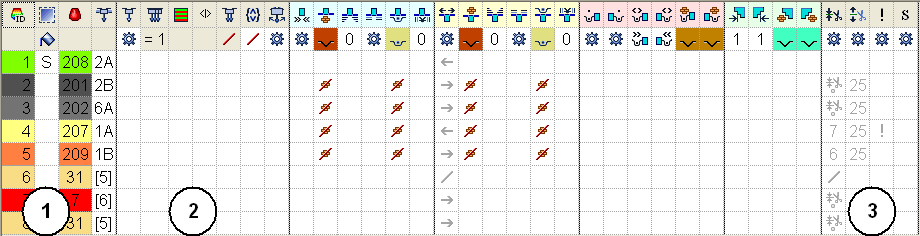
Structure and columns of the yarn field table
Table header:
- 1st row: all the symbols for identification of the table columns
- 2nd row: Default settings for the respective column (settings from machine related file globalparameters.mdv / globalparameters_B.mdv / globalparameters_xxx.mdv))
The default settings are used for all Yarn fields without specifications.
- Zooming the tables with the / (divided) and x (times) keys of the numeric keypad
- Via a selection menu in the 1st line of the table header, the columns can be displayed / hidden.
|
No. | Symbol | Function | Meaning | |
|---|---|---|---|---|
1 |
|
| Default columns of the yarn field table
| |
Yarn carrier section | ||||
2 |
| Yarn Carrier Type | Define the type of the yarn carrier to be used | |
| Multi-system Knitting | Define the number of yarn carriers and the knitting sequence per yarn field
Knitting process:
This setting does not take effect with:
| ||
| System sequence | Allocate an existing system sequence with the desired number of yarn carriers to a jacquard area.
| ||
| Mirrored system sequence | Use the allocated system sequence in mirrored manner.
| ||
| Plating | Define the number of plating yarn carriers per yarn field
| ||
| Combine Yarn Carriers | Combine the yarn carriers of different yarn fields according to the setting
| ||
| Swivel | Definition for the behavior of the intarsia yarn carriers at the color field border | ||
Miscellaneous section | ||||
3 |
| Clamp Yarn Carrier | Specification for the yarn carrier, when it is to be clamped and cut after knitting its yarn field. | |
| Open clamp after ... | Specification for the yarn carrier, after how many pattern rows the yarn can be released from the clamp. | ||
| SEN Edge and Waiting Position | Specifications for positioning the yarn carrier during the knitting
| ||
| Allocate Yarn Carrier to one System | Selection of a knitting system for the selected yarn field
| ||
 : These columns cannot be hidden.


Change the sorting of the columns:
You can change the sorting of all columns.
In the table header of the desired column click on the symbol for the identification of the column and the arrangement will be changed. The arrangement will be changed again by clicking once more.