Change the specifications for the stitch lengths in the pattern:
See and modify specifications for the stitch lengths in the Basic Pattern pattern state.
1
Open the existing pattern and save it with a new name via the File / Save as… menu. - or - Generate a new pattern.
2
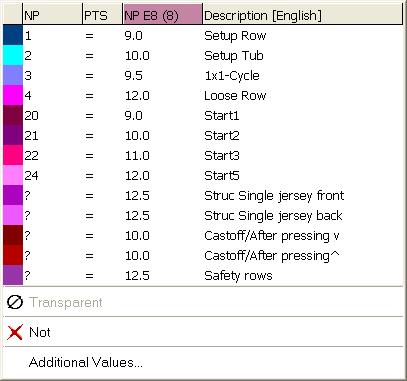
Place the cursor on the control column for the front or rear stitch length in the Symbol View [Basic] and press the right mouse button. - or - Call up the context menu with in the Needle Actions - Stitch Lengths toolbar.
The Stitch lengths context menu appears.
The stitch lengths used in the pattern will be displayed.
The entries selected and used as favorites in the Stitch length table are displayed.
An allocated stitch length can be set to Undefined.
3
Select the desired stitch length in the display and enter it in the control column. - or - Fill a selection.
 pattern state.
 in the Symbol View [Basic] and press the right mouse button.