Change the default settings of the carriage speed
Change the specifications for the carriage speed:
Default Settings
The default settings will be loaded from the Global Pattern Parameters into the pattern (.mdv).
- You can see and change the presettings for carriage speed, machine slow and machine stop referred to knitting rows in the
 pattern state.
- 1
- Open the existing pattern and save it with a new name via the / menu.
- or -
Generate a new pattern. - 2
- Place the cursor in the control column for carriage speed
 . machine slow
  or machine stop
  and press the right mouse button.
- The context menu appears.
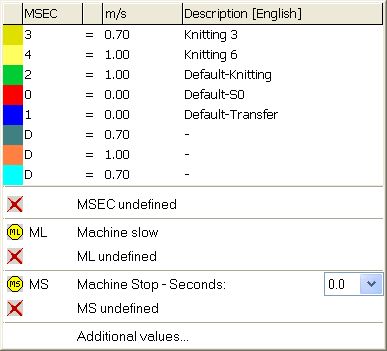
- The carriage speed values used in the pattern will be displayed.
- The entries selected as favorites in the Carriage Speed table are displayed.
- An allocated value can be set to .
- 3
- Select the desired carriage speed value and enter it in the control column.
- or -
Fill a selection.
Additional selection options in the selection window:
- Set the specifications for .
- Set the specifications for .